
Find skills for your task
Discover skills that fit your work and choose where to start. You’ll finish with a categorized selection and a next task to try. The startup example below shows the discovery process; you need a working MassifyAI connection, but no recorded session or upload.
1. Discover skills for your startup
Below is an example prompt which finds a focused selection across the startup journey before you choose one to use. It favors useful matches over a complete catalog inventory. For a different goal, replace the categories with the areas of work you want to explore. A skill carries a specific method; an agent profile combines instructions, skills and business context for a role.
First follow https://www.massifyai.com/docs-assets/setup/connection-check.md. Complete setup only if needed, then continue below.

Confirm my MassifyAI organization and project with whoami. Find a practical selection of skills for an early-stage founder, from shaping an idea to launching a startup. Prioritize broadly useful skills unless I have specified an industry.

Call skills_find_for_task separately for each area below, using focused task descriptions and requesting up to 5 results per call (take = 5).
- Idea and validation: brainstorming, customer interviews, market research, business models.
- Product and design: product requirements, UX, prototypes, design reviews.
- Software and R&D: MVP development, architecture, testing, technical feasibility, experiments.
- Fundraising and finance: pitch decks, investor research, financial models, runway planning.
- Hiring and team: cofounders, key engineering/product/design/sales roles, job descriptions, interviews.
- Contracts and paperwork: NDA triage, contract review, document preparation.
- Positioning and messaging: product marketing, target-customer definition, launch messaging.
- Launch readiness: project planning, pre-mortems, risk review, release checklists, deployment verification.

Keep the scope to these areas. Company formation, founder agreements, pricing, customer acquisition, and customer support are outside this request: do not search for them or report them as missing coverage.

Use at most 10 search calls in total: one per area, plus up to two follow-ups for clear gaps. Do not enumerate the entire catalog or keep searching to fill every category.

Select only strong matches: usually 1-3 per category, aiming for 12-18 unique skills overall, with a hard maximum of 18. Return fewer when the matches are weak. Exclude generic utilities and niche industry tools unless they solve a clear need for this startup. Deduplicate by skill ID and put each skill under its best-fit category. Include only categories with useful verified matches; do not add empty-category or missing-skill lists.

Present the results DIRECTLY IN CHAT. Before the category list, add a short paragraph of 2-3 sentences reflecting my request: I want practical skills to help build a startup, from shaping and validating an idea through product design, development, fundraising, hiring and launch. Explain how the selection helps me move through that journey and choose a useful first task. Adapt this introduction to any startup idea, stage or industry I actually supplied; do not invent details. Place it after any necessary first-time workspace confirmation and brief source attribution, without repeating a workspace confirmation already given earlier in the conversation.

Group the skills under category headings with bullet points. Make each exact returned skill name a clickable Markdown link to its Skill Center detail page: **[exact skill name](actual Skill Center URL)**. Follow it with one concrete startup use and available source/author attribution. Do not leave names as plain text, collect the URLs in a separate list, or substitute an upstream repository link for the Skill Center link. Simply omit author details when they are not provided. Mark the three most useful starting skills with "Start here" within their existing bullets, outside the linked name.

Resolve the links before presenting the selection. Prefer an actual full skill consoleUrl returned by the tools, preserving its query parameters. Otherwise, combine a returned skill consolePath with the verified console origin for this connection. If search returns only skillId, use the supported detail route {consoleOrigin}/skills/{urlEncodedSkillId}, taking the actual skillId from the verified result and the console origin from whoami's consoleUrl or already verified connection context. Do not use the documentation site's host, guess an environment or turn a skill name into an ID. A missing URL field in search is not a reason to omit the links: the returned ID and verified console origin are enough to construct this route. If necessary, use available read-only metadata tools such as skills_get for just the selected IDs, without loading their instructions or enumerating the catalog. If an ID or console origin still cannot be verified, label only that skill's link as unavailable and give the specific missing prerequisite. Do not invent names or links, or claim all Skill Center links are absent merely because search omitted them.

Use a positive, encouraging, practical tone. Focus on what the selected skills help me accomplish. Keep the answer under about 700 words and finish with 2-3 upbeat sentences: the actual number of skills selected, the useful work they cover, and a concrete first step using one of the "Start here" skills. Ground the assessment in verified results; do not exaggerate capabilities, guarantee success, or claim complete coverage.

Do not end with routine caveats about missing topics, absent author metadata, or recovered search retries. Mention a genuine blocker only if it prevents the requested search or use of a recommended skill; keep it brief and give the next action. Never present a failed search as successful.

Do not include a search log or create a file, page, spreadsheet, or downloadable report. Do not load, install, run, save, or modify skills or agent profiles.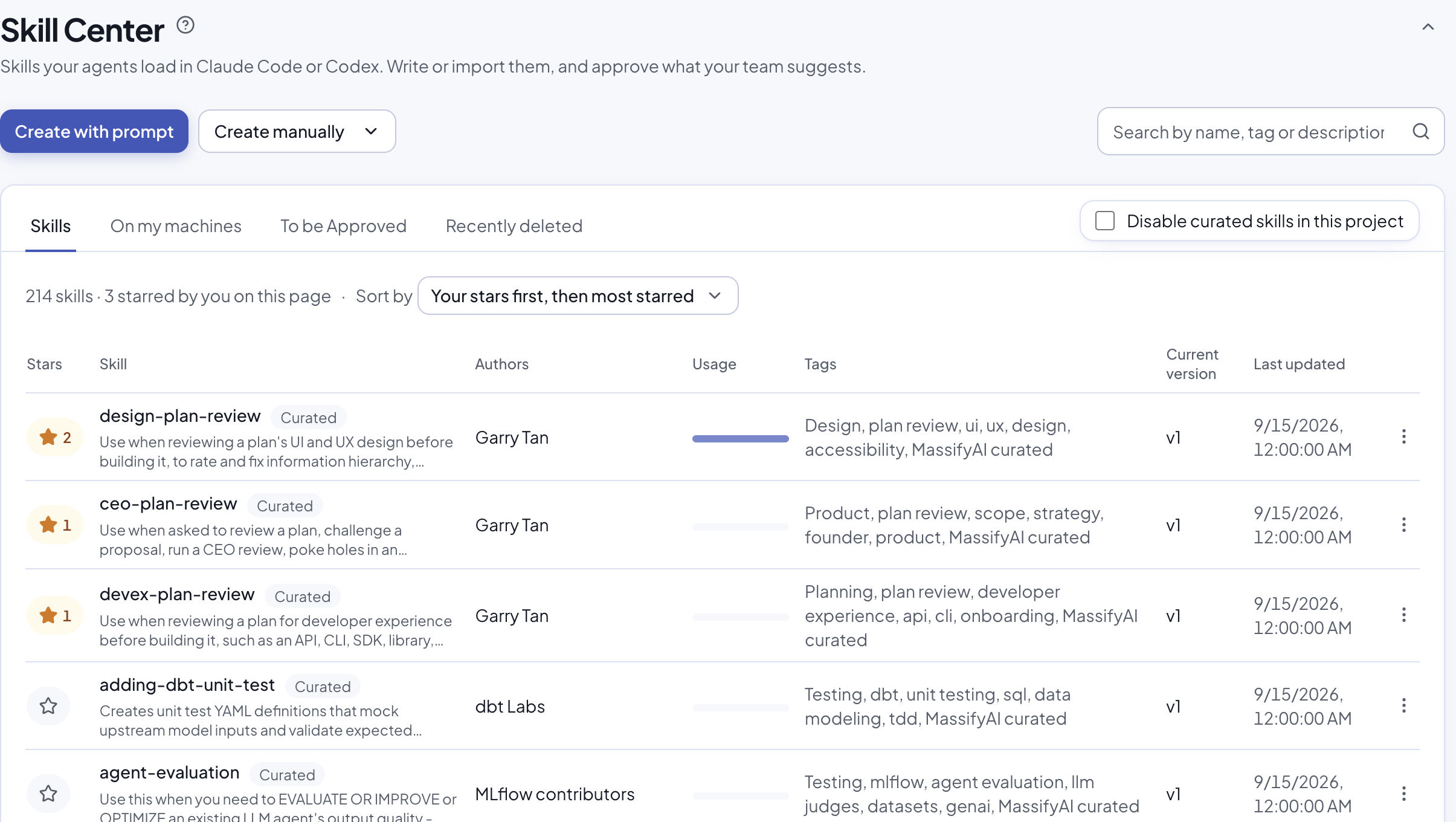
Browse the available methods and compare their descriptions before choosing one for your task.
View full-size skill-library screenshot
2. Choose your next task
Pick a skill from your results and follow a tutorial that applies it to real work:
- Shape a startup idea — Use the Startup Advisor agent profile and office-hours skill to sharpen your customer/problem and choose a validation test.
- Diagnose a recurring bug — Investigate a bug and check the fix.
- Review research results with SQL — Compare results and decide what to try next.
- Build an AI feature with AI Engineer — Turn a feature brief into a tested implementation.
Each tutorial explains what to provide, what a useful result looks like, and how to continue from the evidence you collect.