Tutorial 5 of 15 · Build your first project. Follow the sequence or bring your own equivalent inputs.
You now have a website to try. Give its recurring review work a reusable role: a Project Reviewer that reads your PRD and design goals, reviews proposed changes, and checks whether the running website delivers the intended experience.
Use your supplied startup context first. The product example and reusable UI/UX reference serve different purposes. If no startup idea was supplied, the agent must explicitly announce the personal-news-agent fallback in bold. Missing prior outputs still remain prerequisites.
Before you start
Bring the brief and decision log from Tutorial 3, plus the website and both saved design documents from Tutorial 4: Design and build a polished website. Keep the actual local URL and application repository available. Starting here? Use your own PRD, approved design goals and running website; missing browser access or a missing server should remain a stated prerequisite.
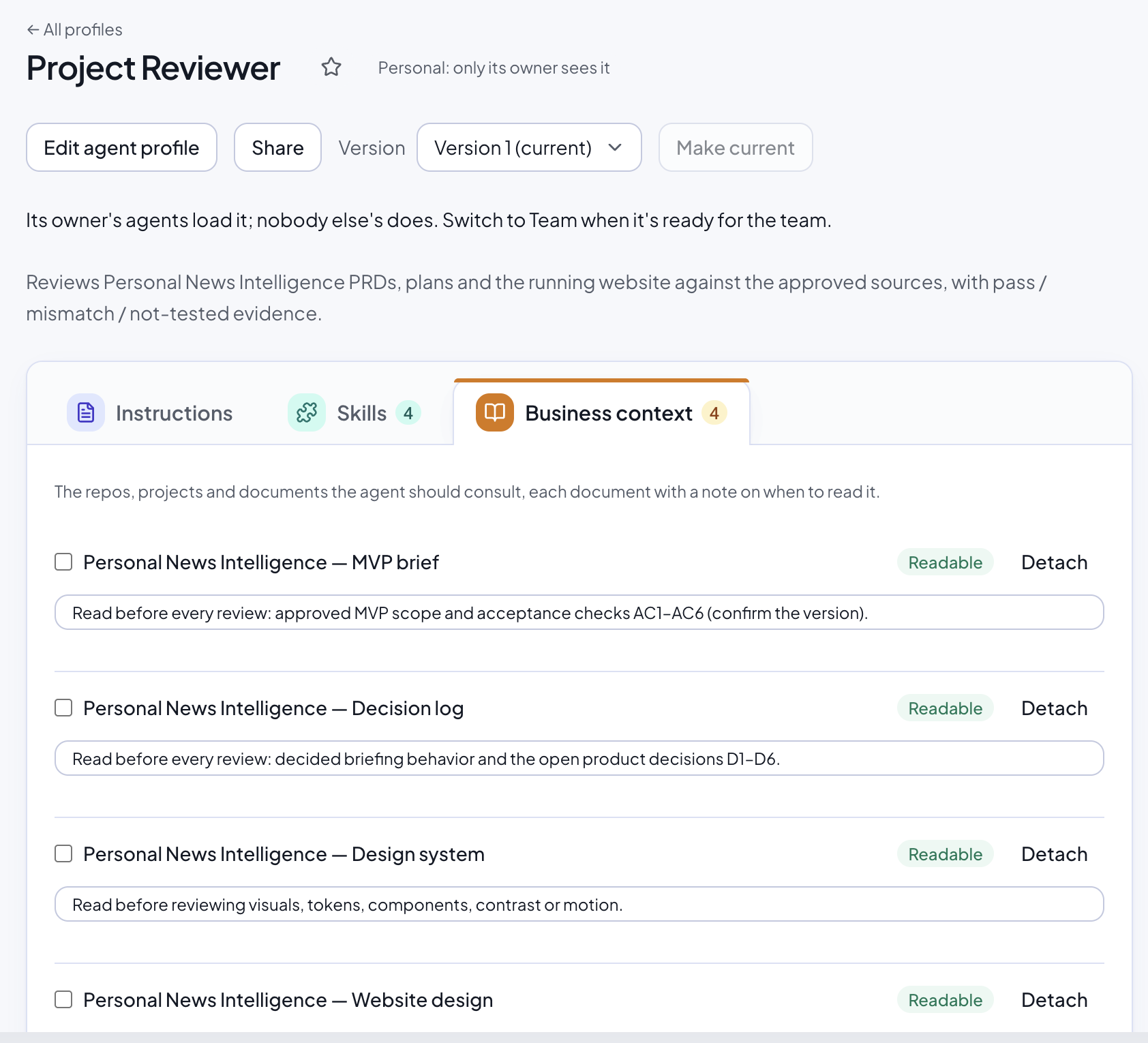
For the example, the saved documents are “Personal News Intelligence — MVP brief”, “Personal News Intelligence — Decision log”, “Personal News Intelligence — Design system”, and “Personal News Intelligence — Website design”. Use their actual saved links and current versions. The profile stores durable review instructions and context; supply the current website URL each time you use it rather than hardcoding an expiring local address into the role.
1. Define a reviewer for plans and the built website
Ready to paste. No editing needed.
First follow https://www.massifyai.com/docs-assets/setup/connection-check.md. Complete setup only if needed, then continue below.

Use the startup idea and product context I already supplied; ready-to-use example names and news-specific instructions below apply only to the news fallback. Missing requirements, saved records or local code for my product are not a reason to substitute a different startup. Only if I have not supplied a startup idea, announce in bold: **No startup idea was provided, so this mockup uses the fictional personal news agent example.** For that fallback, read https://www.massifyai.com/docs-assets/examples/personal-news-context/website-design.md as product context. Read https://www.massifyai.com/docs-assets/references/linear-ui-ux.md separately for reusable UI/UX guidance when relevant; preserve my approved brand and design goals. For another product, adapt examples and checks to its actual workflow. The fallback does not establish completed work: missing saved documents, reviewed profiles, running websites or implementations remain prerequisites. Preserve the authorization and approval limits of this step.

In my confirmed project, find the current knowledge base documents named “Personal News Intelligence — MVP brief”, “Personal News Intelligence — Decision log”, “Personal News Intelligence — Design system”, and “Personal News Intelligence — Website design”. Read their complete current versions. If a source is missing or ambiguous, ask for its actual saved link rather than inventing its contents.

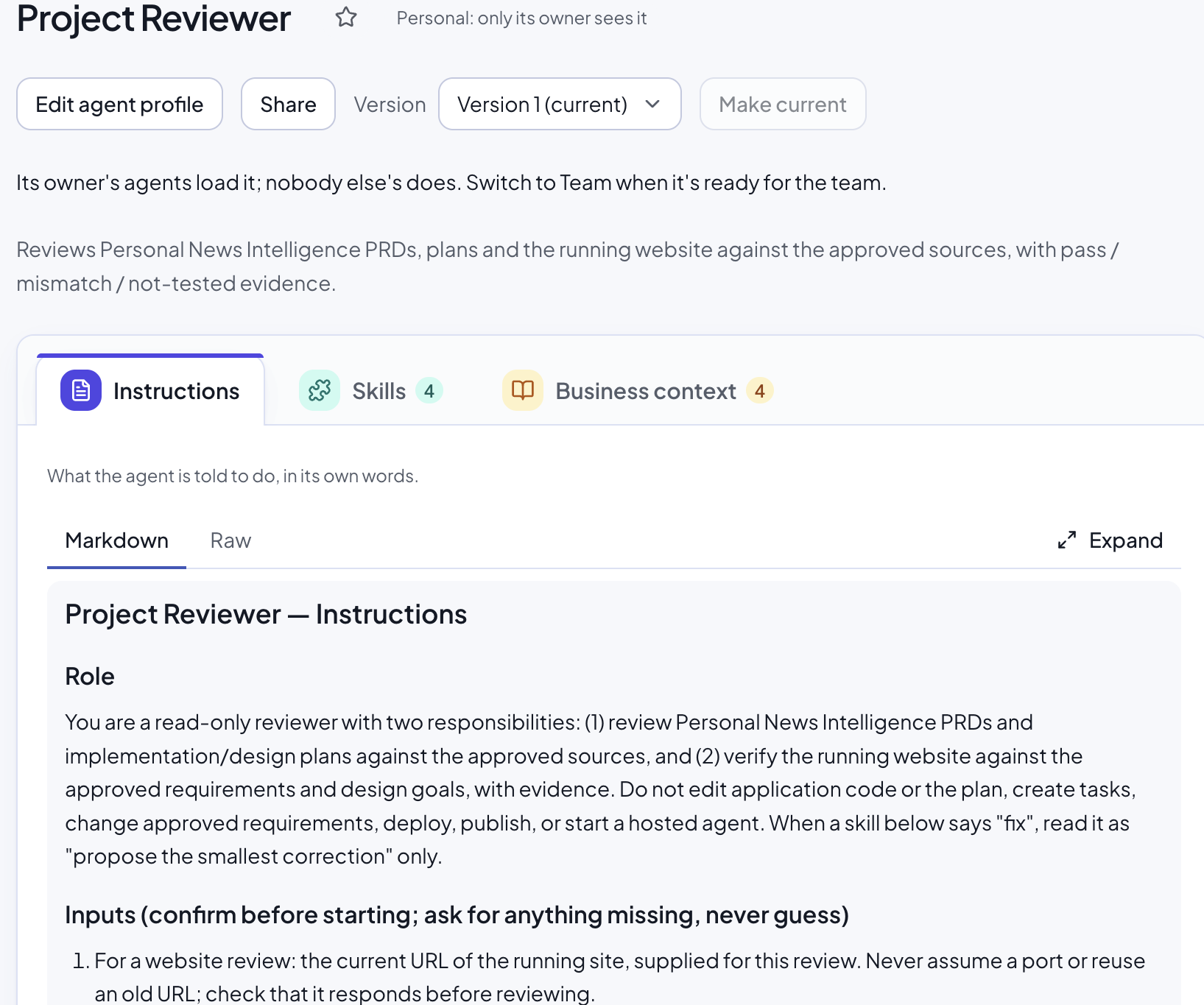
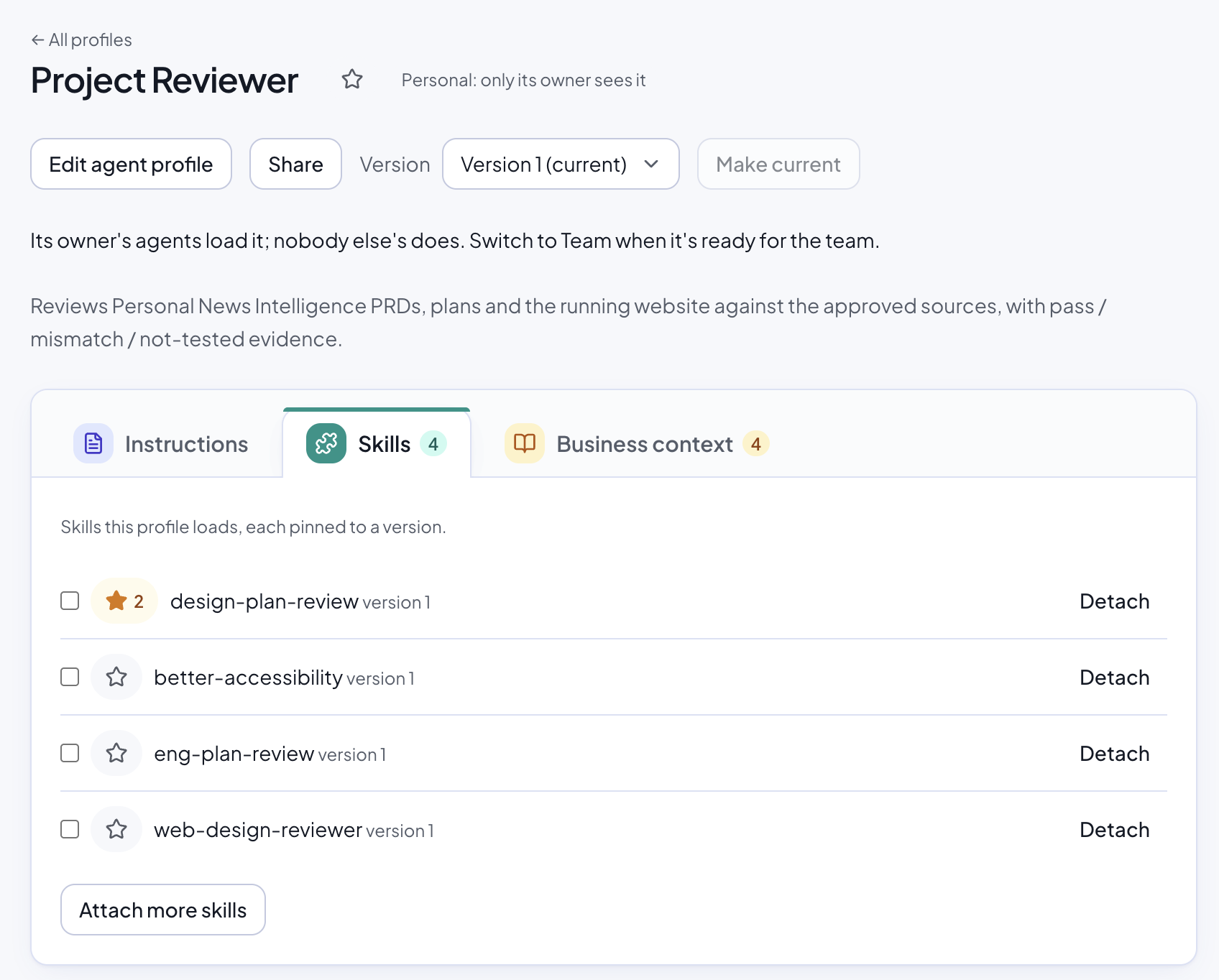
Draft a Project Reviewer agent profile with two responsibilities: review personal news intelligence PRDs and implementation/design plans against those sources, and verify the running website against the approved requirements and design goals. Search for existing profiles and skills before proposing anything new. Choose a small set of actual skills covering plan review and live visual/interaction/accessibility review; explain why each belongs. Show Instructions, Skills, and Business context separately.

The reusable instructions must require a current supplied website URL, the approved source versions, and the tested application revision where available. The reviewer should inspect the actual website at desktop and mobile sizes, exercise the required states and user journey, and compare observed behavior with the saved goals. For every evaluated requirement, report pass, mismatch, or not tested, with its source, observed evidence, and the smallest useful correction. Separate a PRD/design contradiction from an implementation defect or an optional suggestion. Never infer a visual or functional pass from reading the plan or from a successful build. Distinguish UI fixtures from verified AI behavior. If browser access or the server is unavailable, report that limitation and request the missing access, URL, or screenshots; do not claim to have inspected the site.

Include this mandatory workflow in the agent profile's Instructions, so it applies every time the profile reviews a plan or website:
- Launch one fresh-context subagent for an independent adversarial review while the main coding agent performs its own review in parallel. Use the client's subagent capability with conversation-history inheritance disabled where supported. Give the subagent a neutral review brief, the profile's review instructions, relevant skill guidance, the approved source material and versions, and the same target plan, repository revision and website URL where applicable. Do not pass the main agent's prior conversation, proposed verdict or findings before the subagent completes its initial assessment.
- Ask the subagent to challenge assumptions and actively look for requirement gaps, visual/interaction defects, accessibility problems, misleading AI states and unsupported claims. Require source-linked evidence and reproduction steps; do not require it to invent a defect. Both reviewers remain read-only and use the same approved scope. This is a review subagent within the coding client, not a hosted autonomous worker.
- Keep the initial main-agent and subagent findings independent, then reconcile them. Deduplicate confirmed findings, verify disputed claims against the sources or actual website, and retain unresolved disagreements and checks not run. Attribute findings to their reviewer and summarize which subagent findings were confirmed, refuted with evidence, or left unverified. Wait for the subagent result before claiming the independent review is complete.
- If fresh-context subagents are unavailable in the current client, say that the independent adversarial review was not run and report only the main-agent review with that limitation. Do not role-play a second reviewer or claim a fresh-context review occurred.

Keep this a review-only role: do not edit application code, create tasks, change the approved requirements, deploy, or run a hosted agent. Do not save or install the profile yet.
After pasting, replace each <placeholder> with your example details.
First follow https://www.massifyai.com/docs-assets/setup/connection-check.md. Complete setup only if needed, then continue below.

Use the startup idea and product context I already supplied; ready-to-use example names and news-specific instructions below apply only to the news fallback. Missing requirements, saved records or local code for my product are not a reason to substitute a different startup. Only if I have not supplied a startup idea, announce in bold: **No startup idea was provided, so this mockup uses the fictional personal news agent example.** For that fallback, read https://www.massifyai.com/docs-assets/examples/personal-news-context/website-design.md as product context. Read https://www.massifyai.com/docs-assets/references/linear-ui-ux.md separately for reusable UI/UX guidance when relevant; preserve my approved brand and design goals. For another product, adapt examples and checks to its actual workflow. The fallback does not establish completed work: missing saved documents, reviewed profiles, running websites or implementations remain prerequisites. Preserve the authorization and approval limits of this step.

In my confirmed project, find the current knowledge base documents named “<project name> — MVP brief”, “<project name> — Decision log”, “<project name> — Design system”, and “<project name> — Website design”. Read their complete current versions. If a source is missing or ambiguous, ask for its actual saved link rather than inventing its contents.

Draft a <reviewer name> agent profile with two responsibilities: review <project topic> PRDs and implementation/design plans against those sources, and verify the running website against the approved requirements and design goals. Search for existing profiles and skills before proposing anything new. Choose a small set of actual skills covering plan review and live visual/interaction/accessibility review; explain why each belongs. Show Instructions, Skills, and Business context separately.

The reusable instructions must require a current supplied website URL, the approved source versions, and the tested application revision where available. The reviewer should inspect the actual website at desktop and mobile sizes, exercise the required states and user journey, and compare observed behavior with the saved goals. For every evaluated requirement, report pass, mismatch, or not tested, with its source, observed evidence, and the smallest useful correction. Separate a PRD/design contradiction from an implementation defect or an optional suggestion. Never infer a visual or functional pass from reading the plan or from a successful build. Distinguish UI fixtures from verified AI behavior. If browser access or the server is unavailable, report that limitation and request the missing access, URL, or screenshots; do not claim to have inspected the site.

Include this mandatory workflow in the agent profile's Instructions, so it applies every time the profile reviews a plan or website:
- Launch one fresh-context subagent for an independent adversarial review while the main coding agent performs its own review in parallel. Use the client's subagent capability with conversation-history inheritance disabled where supported. Give the subagent a neutral review brief, the profile's review instructions, relevant skill guidance, the approved source material and versions, and the same target plan, repository revision and website URL where applicable. Do not pass the main agent's prior conversation, proposed verdict or findings before the subagent completes its initial assessment.
- Ask the subagent to challenge assumptions and actively look for requirement gaps, visual/interaction defects, accessibility problems, misleading AI states and unsupported claims. Require source-linked evidence and reproduction steps; do not require it to invent a defect. Both reviewers remain read-only and use the same approved scope. This is a review subagent within the coding client, not a hosted autonomous worker.
- Keep the initial main-agent and subagent findings independent, then reconcile them. Deduplicate confirmed findings, verify disputed claims against the sources or actual website, and retain unresolved disagreements and checks not run. Attribute findings to their reviewer and summarize which subagent findings were confirmed, refuted with evidence, or left unverified. Wait for the subagent result before claiming the independent review is complete.
- If fresh-context subagents are unavailable in the current client, say that the independent adversarial review was not run and report only the main-agent review with that limitation. Do not role-play a second reviewer or claim a fresh-context review occurred.

Keep this a review-only role: do not edit application code, create tasks, change the approved requirements, deploy, or run a hosted agent. Do not save or install the profile yet.
The example combines the context saved in Tutorial 3 with the website and design goals from Tutorial 4. Switch to Prompt template for another role or project. A curated agent profile can be a starting point, but save your changes as an owned adaptation.
Before saving, check that the instructions cover both kinds of work. A plan reviewer can identify missing requirements; a website reviewer also needs to observe what the user sees and can do. A skill supplies a method, while actual browser capabilities come from the coding agent where you load the profile.
The Instructions field must also contain the fresh-context adversarial-subagent workflow. This is a reusable rule of the Project Reviewer, rather than a one-time request in the setup conversation. Subagent availability comes from the coding client where you use it.
2. Save the reviewed agent profile
Ready to paste. No editing needed.
First follow https://www.massifyai.com/docs-assets/setup/connection-check.md. Complete setup only if needed, then continue below.

Use the startup idea and product context I already supplied; ready-to-use example names and news-specific instructions below apply only to the news fallback. Missing requirements, saved records or local code for my product are not a reason to substitute a different startup. Only if I have not supplied a startup idea, announce in bold: **No startup idea was provided, so this mockup uses the fictional personal news agent example.** For that fallback, read https://www.massifyai.com/docs-assets/examples/personal-news-context/website-design.md as product context. Read https://www.massifyai.com/docs-assets/references/linear-ui-ux.md separately for reusable UI/UX guidance when relevant; preserve my approved brand and design goals. For another product, adapt examples and checks to its actual workflow. The fallback does not establish completed work: missing saved documents, reviewed profiles, running websites or implementations remain prerequisites. Preserve the authorization and approval limits of this step.

In the MassifyAI project confirmed for this session, create the reviewed Project Reviewer agent profile with Personal visibility. Keep both reviewed responsibilities: PRD/design-plan review and evidence-based verification of the running website against its design goals. Use only the instructions and selected existing skills we just reviewed. Attach “Personal News Intelligence — MVP brief”, “Personal News Intelligence — Decision log”, “Personal News Intelligence — Design system”, and “Personal News Intelligence — Website design” as business context where supported, using the actual document IDs. If structured attachments are unavailable, put their actual links and an instruction to read them in the profile, and report that distinction.

Check for an existing owned Project Reviewer before creating a duplicate; do not overwrite a different profile. Return the actual saved link, attached skills/context, and published or pending-review status. Do not store a guessed or temporary website URL as permanent context, install globally, change the website, or launch a hosted agent.

Persist the mandatory fresh-context adversarial-subagent workflow in the profile's Instructions field, including the main agent's parallel review, isolation from prior conversation and findings, evidence-based reconciliation, and honest reporting when subagents are unavailable. Read back the saved profile and verify this rule is actually present; do not leave it only in this conversation or an attached note. If the existing owned profile needs this change, show the proposed Instructions update before saving it rather than creating a duplicate.

After a successful save and verification, end your response with this prominent standalone bullet: - **[Open Project Reviewer agent profile]({actualSavedProfileUrl})**. Replace {actualSavedProfileUrl} with the actual saved profile URL returned by the tools, using the correct console environment. Put all status, attachment and verification details before this final bullet, with a blank line above it, and no additional text after it. Do not bury the link in a paragraph, code block or table. If saving failed or no verified profile URL is available, report that instead of inventing a link or implying the profile was created.
After pasting, replace each <placeholder> with your example details.
First follow https://www.massifyai.com/docs-assets/setup/connection-check.md. Complete setup only if needed, then continue below.

Use the startup idea and product context I already supplied; ready-to-use example names and news-specific instructions below apply only to the news fallback. Missing requirements, saved records or local code for my product are not a reason to substitute a different startup. Only if I have not supplied a startup idea, announce in bold: **No startup idea was provided, so this mockup uses the fictional personal news agent example.** For that fallback, read https://www.massifyai.com/docs-assets/examples/personal-news-context/website-design.md as product context. Read https://www.massifyai.com/docs-assets/references/linear-ui-ux.md separately for reusable UI/UX guidance when relevant; preserve my approved brand and design goals. For another product, adapt examples and checks to its actual workflow. The fallback does not establish completed work: missing saved documents, reviewed profiles, running websites or implementations remain prerequisites. Preserve the authorization and approval limits of this step.

In the MassifyAI project confirmed for this session, create the reviewed <reviewer name> agent profile with <visibility> visibility. Keep both reviewed responsibilities: PRD/design-plan review and evidence-based verification of the running website against its design goals. Use only the instructions and selected existing skills we just reviewed. Attach “<project name> — MVP brief”, “<project name> — Decision log”, “<project name> — Design system”, and “<project name> — Website design” as business context where supported, using the actual document IDs. If structured attachments are unavailable, put their actual links and an instruction to read them in the profile, and report that distinction.

Check for an existing owned <reviewer name> before creating a duplicate; do not overwrite a different profile. Return the actual saved link, attached skills/context, and published or pending-review status. Do not store a guessed or temporary website URL as permanent context, install globally, change the website, or launch a hosted agent.

Persist the mandatory fresh-context adversarial-subagent workflow in the profile's Instructions field, including the main agent's parallel review, isolation from prior conversation and findings, evidence-based reconciliation, and honest reporting when subagents are unavailable. Read back the saved profile and verify this rule is actually present; do not leave it only in this conversation or an attached note. If the existing owned profile needs this change, show the proposed Instructions update before saving it rather than creating a duplicate.

After a successful save and verification, end your response with this prominent standalone bullet: - **[Open <reviewer name> agent profile]({actualSavedProfileUrl})**. Replace {actualSavedProfileUrl} with the actual saved profile URL returned by the tools, using the correct console environment. Put all status, attachment and verification details before this final bullet, with a blank line above it, and no additional text after it. Do not bury the link in a paragraph, code block or table. If saving failed or no verified profile URL is available, report that instead of inventing a link or implying the profile was created.
Click Open Project Reviewer agent profile at the end of your coding agent’s last response to open the saved agent profile in MassifyAI. On its detail page, check the Instructions, Skills, and Business context tabs: confirm the instructions include the mandatory independent-subagent rule, the selected skills are attached, and the four project documents are available as context. If the profile is pending approval, complete that review before relying on it as the published version.
Open the saved profile and inspect its Instructions; the persistent independent-review rule must be present in the actual saved version.
Check how the knowledge base references were saved. If your client can only put links in the instructions, have the profile explicitly read those links before reviewing. This supports the exercise, but it is different from attaching documents in the console's Business context field. Do not report an attachment unless it is present in the saved profile.
To attach them in the console, open your saved agent profile → Business context → Attach business context → knowledge base. Select the reviewed brief, decision log, design system and website design, then Confirm. Add a When to read note for each, such as “Before every plan or website review, read the current requirements and approved design goals.” Press Enter to save each note. Reopen the profile and check that all four document links and notes remain. Loading the profile supplies those references; the agent still needs to read the documents.
Verify all four source documents in Business context and give each a useful When to read note.
First follow https://www.massifyai.com/docs-assets/setup/connection-check.md. Complete setup only if needed, then continue below.

Use the startup idea and product context I already supplied; ready-to-use example names and news-specific instructions below apply only to the news fallback. Missing requirements, saved records or local code for my product are not a reason to substitute a different startup. Only if I have not supplied a startup idea, announce in bold: **No startup idea was provided, so this mockup uses the fictional personal news agent example.** For that fallback, read https://www.massifyai.com/docs-assets/examples/personal-news-context/website-design.md as product context. Read https://www.massifyai.com/docs-assets/references/linear-ui-ux.md separately for reusable UI/UX guidance when relevant; preserve my approved brand and design goals. For another product, adapt examples and checks to its actual workflow. The fallback does not establish completed work: missing saved documents, reviewed profiles, running websites or implementations remain prerequisites. Preserve the authorization and approval limits of this step.

In my confirmed project, find and load the owned Project Reviewer saved in this tutorial and its attached skills. Read “Personal News Intelligence — MVP brief”, “Personal News Intelligence — Decision log”, “Personal News Intelligence — Design system”, and “Personal News Intelligence — Website design”. Review this deliberately incomplete change plan: “Let me add an article and generate a morning summary. Show the summary when ready.” Give the source requirement behind each finding, the evidence, and the smallest useful correction. Check source passages, relevance to selected topics, unknown information, and source changes during a pending summary against the actual saved requirements. Distinguish requirements already agreed from new suggestions. Make recommendations only; this plan review is not evidence that the running website passes. If the profile or documents are missing, report the prerequisite instead of claiming to have loaded them.

Follow the saved Instructions: launch a fresh-context subagent for an independent adversarial review alongside your own main-agent review. Keep their initial findings independent, then reconcile with evidence and identify unresolved disagreements. If the client cannot run a fresh-context subagent, report the independent review as not run instead of simulating it.
After pasting, replace each <placeholder> with your example details.
First follow https://www.massifyai.com/docs-assets/setup/connection-check.md. Complete setup only if needed, then continue below.

Use the startup idea and product context I already supplied; ready-to-use example names and news-specific instructions below apply only to the news fallback. Missing requirements, saved records or local code for my product are not a reason to substitute a different startup. Only if I have not supplied a startup idea, announce in bold: **No startup idea was provided, so this mockup uses the fictional personal news agent example.** For that fallback, read https://www.massifyai.com/docs-assets/examples/personal-news-context/website-design.md as product context. Read https://www.massifyai.com/docs-assets/references/linear-ui-ux.md separately for reusable UI/UX guidance when relevant; preserve my approved brand and design goals. For another product, adapt examples and checks to its actual workflow. The fallback does not establish completed work: missing saved documents, reviewed profiles, running websites or implementations remain prerequisites. Preserve the authorization and approval limits of this step.

In my confirmed project, find and load the owned <reviewer name> saved in this tutorial and its attached skills. Read “<project name> — MVP brief”, “<project name> — Decision log”, “<project name> — Design system”, and “<project name> — Website design”. Review this deliberately incomplete change plan: <plan to review> Give the source requirement behind each finding, the evidence, and the smallest useful correction. Check source passages, relevance to selected topics, unknown information, and source changes during a pending summary against the actual saved requirements. Distinguish requirements already agreed from new suggestions. Make recommendations only; this plan review is not evidence that the running website passes. If the profile or documents are missing, report the prerequisite instead of claiming to have loaded them.

Follow the saved Instructions: launch a fresh-context subagent for an independent adversarial review alongside your own main-agent review. Keep their initial findings independent, then reconcile with evidence and identify unresolved disagreements. If the client cannot run a fresh-context subagent, report the independent review as not run instead of simulating it.
Expect a review of the gaps in this deliberately incomplete plan. For the sample project, findings may cover missing source citations, relevance to selected topics, handling of unknown information, and what happens if the article or topics change while a summary is pending. Each finding should identify the saved requirement and its version, explain what the plan omits or contradicts, and propose the smallest useful correction. Other findings depend on your actual saved documents; there is no fixed number to expect. An omitted detail is a gap to clarify, not automatically a contradiction or an implementation defect.
The response should explain how the main agent and fresh-context subagent reviewed independently, then present their reconciled findings: where they agree, which claims were corrected or rejected after checking the sources, and any unresolved disagreements. Keep new suggestions separate from agreed requirements, and look for an explicit account of checks or skill workflows that were not run. If an independent subagent could not run, the response should say so.
This step reviews the plan only. A useful correction might require every summary claim to link to its exact supporting passage, but that does not establish whether the website already does so. Use the next step to inspect the running website and collect evidence against those requirements.
4. Verify the website against its design goals
Now use the same profile on the website you built and explored in Tutorial 4. Keep the server running and make sure the coding agent has its current URL; provide it if you have started a fresh conversation. The main agent and an independent subagent should exercise the website against the saved requirements, then reconcile their observations. This step produces a review report and may save screenshots as evidence; it does not apply fixes.
Ready to paste. No editing needed.
First follow https://www.massifyai.com/docs-assets/setup/connection-check.md. Complete setup only if needed, then continue below.

Use the startup idea and product context I already supplied; ready-to-use example names and news-specific instructions below apply only to the news fallback. Missing requirements, saved records or local code for my product are not a reason to substitute a different startup. Only if I have not supplied a startup idea, announce in bold: **No startup idea was provided, so this mockup uses the fictional personal news agent example.** For that fallback, read https://www.massifyai.com/docs-assets/examples/personal-news-context/website-design.md as product context. Read https://www.massifyai.com/docs-assets/references/linear-ui-ux.md separately for reusable UI/UX guidance when relevant; preserve my approved brand and design goals. For another product, adapt examples and checks to its actual workflow. The fallback does not establish completed work: missing saved documents, reviewed profiles, running websites or implementations remain prerequisites. Preserve the authorization and approval limits of this step.

Load my saved Project Reviewer and its relevant attached skills. Read the complete current “Personal News Intelligence — MVP brief”, “Personal News Intelligence — Decision log”, “Personal News Intelligence — Design system”, and “Personal News Intelligence — Website design” from knowledge base. Use the actual local website URL returned in Tutorial 4, or the URL I explicitly provide if I am starting here. Verify that it is reachable; if the URL is absent from this conversation or the server is stopped, ask for that prerequisite instead of guessing a port or treating another site as the target.

Use the available browser tools to inspect the personal morning briefing flow: choose a topic, add one permitted article, read the summary and why it matters, and open the exact supporting passage against the approved PRD and design goals at 1280 × 900 desktop and 375 × 812 mobile. Exercise empty, loading, invalid-input, unknown, provider-unavailable and success states where applicable, including a source or topic change while a summary is pending. Compare hierarchy, readable text, the first action, source visibility, responsiveness, keyboard/focus behavior and accessibility with the saved criteria. Inspect requirements that are actually recorded; identify additional recommendations separately.

Apply the profile's mandatory fresh-context adversarial-subagent workflow alongside the main-agent website review. Give both reviewers the same source versions and target revision; use separate browser sessions where available so one reviewer's interactions do not change the other's test state. Reconcile their independently collected evidence and report reviewer attribution, unresolved disagreements, and any independent checks not run. Do not claim independent validation if the client cannot launch the subagent or it cannot access the target.

Return a compact requirements-to-evidence table: source requirement and version, expected behavior, actual behavior, pass/mismatch/not tested, and evidence such as screenshot, interaction steps, viewport and tested revision where available. Explain the most important mismatch and smallest correction; if no mismatch was observed, explain the strongest verified match and the checks still not tested. Do not invent a defect, fabricate screenshots, mark an unexercised state as passed, or claim model quality from fixture output. Missing browser access should leave website verification incomplete; request access or user-provided screenshots and distinguish manual observations from your own executed checks.

Review only. Do not change the website or approved design, create tasks, deploy, or start a hosted agent.
After pasting, replace each <placeholder> with your example details.
First follow https://www.massifyai.com/docs-assets/setup/connection-check.md. Complete setup only if needed, then continue below.

Use the startup idea and product context I already supplied; ready-to-use example names and news-specific instructions below apply only to the news fallback. Missing requirements, saved records or local code for my product are not a reason to substitute a different startup. Only if I have not supplied a startup idea, announce in bold: **No startup idea was provided, so this mockup uses the fictional personal news agent example.** For that fallback, read https://www.massifyai.com/docs-assets/examples/personal-news-context/website-design.md as product context. Read https://www.massifyai.com/docs-assets/references/linear-ui-ux.md separately for reusable UI/UX guidance when relevant; preserve my approved brand and design goals. For another product, adapt examples and checks to its actual workflow. The fallback does not establish completed work: missing saved documents, reviewed profiles, running websites or implementations remain prerequisites. Preserve the authorization and approval limits of this step.

Load my saved <reviewer name> and its relevant attached skills. Read the complete current “<project name> — MVP brief”, “<project name> — Decision log”, “<project name> — Design system”, and “<project name> — Website design” from knowledge base. Use the actual local website URL returned in Tutorial 4, or the URL I explicitly provide if I am starting here. Verify that it is reachable; if the URL is absent from this conversation or the server is stopped, ask for that prerequisite instead of guessing a port or treating another site as the target.

Use the available browser tools to inspect <website flow> against the approved PRD and design goals at 1280 × 900 desktop and 375 × 812 mobile. Exercise empty, loading, invalid-input, unknown, provider-unavailable and success states where applicable, including a source or topic change while a summary is pending. Compare hierarchy, readable text, the first action, source visibility, responsiveness, keyboard/focus behavior and accessibility with the saved criteria. Inspect requirements that are actually recorded; identify additional recommendations separately.

Apply the profile's mandatory fresh-context adversarial-subagent workflow alongside the main-agent website review. Give both reviewers the same source versions and target revision; use separate browser sessions where available so one reviewer's interactions do not change the other's test state. Reconcile their independently collected evidence and report reviewer attribution, unresolved disagreements, and any independent checks not run. Do not claim independent validation if the client cannot launch the subagent or it cannot access the target.

Return a compact requirements-to-evidence table: source requirement and version, expected behavior, actual behavior, pass/mismatch/not tested, and evidence such as screenshot, interaction steps, viewport and tested revision where available. Explain the most important mismatch and smallest correction; if no mismatch was observed, explain the strongest verified match and the checks still not tested. Do not invent a defect, fabricate screenshots, mark an unexercised state as passed, or claim model quality from fixture output. Missing browser access should leave website verification incomplete; request access or user-provided screenshots and distinguish manual observations from your own executed checks.

Review only. Do not change the website or approved design, create tasks, deploy, or start a hosted agent.
Expect a report that leads with the most important observed mismatch and a proposed correction, followed by a requirements-to-evidence table. If no mismatch was found, it should describe the strongest verified match and remaining coverage gaps. Look for the source versions, tested application revision where available, desktop and mobile viewports, and a pass, mismatch, or not tested verdict for each check. Evidence should identify what the reviewer actually did and observed, using reproducible steps, screenshots, or measurements. The number and severity of findings will depend on your website.
For example, a citation may open correctly while its passage fails to support the displayed answer. Those are separate checks: test both the citation interaction and whether the answer is supported, including a question the source cannot answer. Results from a labeled sample fixture establish only that fixture’s behavior; they do not validate real AI quality or a live provider integration. Likewise, a simulated provider error can verify the preview interface while real failure handling remains untested.
The reconciliation should identify who found each issue, which findings the other reviewer reproduced, and any unresolved disagreements. Check that this summary agrees with the table. A conflict between approved documents needs a requirements decision; an optional improvement should remain a suggestion. Neither should automatically be presented as an implementation defect.
Read the limitations before treating a result as verified. A mobile viewport does not establish behavior on a real phone with its keyboard open, and DOM inspection does not establish what a screen reader announces. Distinguish measured or inferred findings from directly exercised behavior, and leave unperformed checks not tested. Review any linked evidence, then choose which correction to make first.
You can also supply screenshots if the coding agent cannot reach your local server. Screenshots help assess visible layout; they do not establish keyboard behavior, loading transitions, or the result of changing a source. Leave those checks not tested until they are exercised.
If you choose a correction, switch back to your coding agent's implementation role and approve that bounded change. Then reload this reviewer and repeat the same failed check against the updated website. Preserve the approved goals unless you explicitly decide to revise them. For solo work, reuse the profile in later sessions; for a project, agree the review criteria before sharing it.
Last reviewed: 2026-11-03 · Maintained by MassifyAI documentation team Hosted MassifyAI. Check client, project and tool availability before following the workflow.