Tutorial 4 of 15 · Build your first project. Follow the sequence or bring your own equivalent inputs.
Continue from Tutorial 3 or start here. The prompts use your existing project context when available and supply example context when needed. You do not need an owned agent profile yet: first build something you can use, then create a reusable reviewer to check it.
Use MassifyAI's curated design-plan-review, adapted from Garry Tan's gstack, to make the important visual and interaction decisions before code makes them expensive. Bring a concrete page or flow, the repository that will contain it, and any existing brand or design constraints.
This is an interactive review, not a one-shot “make it modern” prompt. The skill examines information hierarchy, interaction states, the user journey, generic AI-looking patterns, design-system alignment, responsiveness and accessibility. You can choose each design decision or explicitly delegate the recommended design choices. An optional mockup preview comes before implementation.
Before you start, open the application repository you want to change in your coding agent and connect MassifyAI if needed. Paste the prompts below into that agent’s chat. The console links open the skill or profile details; they do not run the review. Tutorial 4 focuses on visual design and interface interactions. The interface should immediately communicate your product and its primary task. News-specific interests, briefing, generation, citations and questions apply only to the fallback example. Use clearly labeled sample output to demonstrate the experience; real inference integration and answer-quality evaluation belong to Tutorial 6.
Use the Linear-inspired UI/UX reference for reusable visual and flow guidance, separately from the personal news agent product example. Your supplied startup idea always takes priority. An incomplete idea is still your idea; the agent should ask for missing facts instead of replacing it.
No startup idea supplied? The mockup falls back to the fictional personal news agent, and the agent must announce that fallback in bold.
1. Write a concrete design plan
Start with a named plan so the review has an exact target. If a plan already exists, skip to step 2. For your own project, replace the angle-bracket fields below before pasting. For a ready-to-paste first run, use the personal news intelligence example in step 1.1 instead; you do not need both planning prompts.
Ready to paste. No editing needed.
First follow https://www.massifyai.com/docs-assets/setup/connection-check.md. Complete setup only if needed, then continue below.

First identify the startup idea and product context I already supplied in our current conversation or selected project materials. Use that product even if ready-to-use example values below describe Personal News Intelligence. Missing details within an existing idea are not a reason to replace it. Read https://www.massifyai.com/docs-assets/references/linear-ui-ux.md separately for reusable UI/UX style, layout, flow and accessibility guidance. It supplies no product requirements and does not override my approved brand or design system.

Only if I have not supplied a startup idea, announce in bold: **No startup idea was provided, so this mockup uses the fictional personal news agent example.** Then read https://www.massifyai.com/docs-assets/examples/personal-news-context/website-design.md for that example's product and workflow, and https://www.massifyai.com/docs-assets/examples/personal-news-context/index.md for its linked context and version notes. Do not import Daybreak branding, news actions, the fictional article or T1/T2 into another startup.

In my confirmed project for Personal News Intelligence, using the actual selected product name if the example differs, resolve that product's own brief, decision log, design system, website plan and relevant tasks; do not require news-specific task names for another product. Prefer each complete current knowledge base or Task Board record and its actual link/version, including relevant comments. For each record not found, use a hosted copy only if it belongs to that same product; otherwise ask for essential missing information. Mix live sources with fallbacks only for missing records within the selected product. Do not treat an access error or ambiguous match as not found. Never invent record IDs, import the pack or create tasks merely to start this tutorial. Historical approvals, file inventories and test results are references, not my approval or evidence about my repository. No historical model or budget approval authorizes calls here.

In the current application repository, create a concrete plan at docs/personal-news-design.md for a personal morning briefing, grounded in the selected product context and the separate UI/UX reference. Keep actual source links, versions or snapshot dates and source type in the plan. The reader wants to follow selected topics without scanning many feeds. The proposed experience should feel dark, sleek, and cool-toned; distinguish proposals from approved requirements. Inspect DESIGN.md, current UI patterns and the actual framework where available. Preserve unrelated work, the existing stack, brand and approved functional scope. Missing local code or earlier tutorial outputs need not block planning.

Specify the product's purpose, primary action, first-use welcome, populated result and next step. Derive navigation and secondary panels from the actual task, not from the news example or Linear's project-management features. Include empty, loading, input-error, unavailable, success and partial states where relevant, plus changed-context and recovery behavior. Specify keyboard/focus, screen-reader, contrast and mobile touch-target requirements at 1280 × 900 and 375 × 812, with fluid intermediate widths.

For the personal-news fallback only, apply the product-design document's sample action, selected interests, closed source drawer, generation action, source-grounded takeaways, relevance, citations, unknowns and question composer. Preserve its exact disabled-composer prerequisite text and stale-response checks. Use labeled Sample preview and truthful AI not connected states. For another product, choose product-appropriate content, actions, labels and deterministic examples. Do not invent sources, relevance, capability, live data or completed operations. Record unresolved facts explicitly. Do not implement, add providers, call models or deploy.
After pasting, replace each <placeholder> with your example details.
First follow https://www.massifyai.com/docs-assets/setup/connection-check.md. Complete setup only if needed, then continue below.

First identify the startup idea and product context I already supplied in our current conversation or selected project materials. Use that product even if ready-to-use example values below describe Personal News Intelligence. Missing details within an existing idea are not a reason to replace it. Read https://www.massifyai.com/docs-assets/references/linear-ui-ux.md separately for reusable UI/UX style, layout, flow and accessibility guidance. It supplies no product requirements and does not override my approved brand or design system.

Only if I have not supplied a startup idea, announce in bold: **No startup idea was provided, so this mockup uses the fictional personal news agent example.** Then read https://www.massifyai.com/docs-assets/examples/personal-news-context/website-design.md for that example's product and workflow, and <context pack> for its linked context and version notes. Do not import Daybreak branding, news actions, the fictional article or T1/T2 into another startup.

In my confirmed project for <project name>, using the actual selected product name if the example differs, resolve that product's own brief, decision log, design system, website plan and relevant tasks; do not require news-specific task names for another product. Prefer each complete current knowledge base or Task Board record and its actual link/version, including relevant comments. For each record not found, use a hosted copy only if it belongs to that same product; otherwise ask for essential missing information. Mix live sources with fallbacks only for missing records within the selected product. Do not treat an access error or ambiguous match as not found. Never invent record IDs, import the pack or create tasks merely to start this tutorial. Historical approvals, file inventories and test results are references, not my approval or evidence about my repository. No historical model or budget approval authorizes calls here.

In the current application repository, create a concrete plan at <plan file> for <page or flow>, grounded in the selected product context and the separate UI/UX reference. Keep actual source links, versions or snapshot dates and source type in the plan. <user goal> The proposed experience should feel <three qualities>; distinguish proposals from approved requirements. Inspect DESIGN.md, current UI patterns and the actual framework where available. Preserve unrelated work, the existing stack, brand and approved functional scope. Missing local code or earlier tutorial outputs need not block planning.

Specify the product's purpose, primary action, first-use welcome, populated result and next step. Derive navigation and secondary panels from the actual task, not from the news example or Linear's project-management features. Include empty, loading, input-error, unavailable, success and partial states where relevant, plus changed-context and recovery behavior. Specify keyboard/focus, screen-reader, contrast and mobile touch-target requirements at 1280 × 900 and 375 × 812, with fluid intermediate widths.

For the personal-news fallback only, apply the product-design document's sample action, selected interests, closed source drawer, generation action, source-grounded takeaways, relevance, citations, unknowns and question composer. Preserve its exact disabled-composer prerequisite text and stale-response checks. Use labeled Sample preview and truthful AI not connected states. For another product, choose product-appropriate content, actions, labels and deterministic examples. Do not invent sources, relevance, capability, live data or completed operations. Record unresolved facts explicitly. Do not implement, add providers, call models or deploy.
1.1 Give the plan real inputs
The agent first selects your product context, then uses the reusable UI/UX reference independently. It resolves your own brief, decisions, design system, plan and relevant tasks when available. Only the no-idea fallback uses the personal-news pack, its T1/T2 and fictional article. Missing records for another startup must not be filled with news requirements.
Your named local plan is the working design document; docs/personal-news-design.md is only the example path. The supplied design is a reference, not proof that your plan has already been reviewed. Finalize your own design decisions before building, then save your resulting documents to knowledge base when available.
Ready to paste. No editing needed.
First follow https://www.massifyai.com/docs-assets/setup/connection-check.md. Complete setup only if needed, then continue below.

First identify the startup idea and product context I already supplied in our current conversation or selected project materials. Use that product even if ready-to-use example values below describe Personal News Intelligence. Missing details within an existing idea are not a reason to replace it. Read https://www.massifyai.com/docs-assets/references/linear-ui-ux.md separately for reusable UI/UX style, layout, flow and accessibility guidance. It supplies no product requirements and does not override my approved brand or design system.

Only if I have not supplied a startup idea, announce in bold: **No startup idea was provided, so this mockup uses the fictional personal news agent example.** Then read https://www.massifyai.com/docs-assets/examples/personal-news-context/website-design.md for that example's product and workflow, and https://www.massifyai.com/docs-assets/examples/personal-news-context/index.md for its linked context and version notes. Do not import Daybreak branding, news actions, the fictional article or T1/T2 into another startup.

In my confirmed project for Personal News Intelligence, using the actual selected product name if the example differs, resolve that product's own brief, decision log, design system, website plan and relevant tasks; do not require news-specific task names for another product. Prefer each complete current knowledge base or Task Board record and its actual link/version, including relevant comments. For each record not found, use a hosted copy only if it belongs to that same product; otherwise ask for essential missing information. Mix live sources with fallbacks only for missing records within the selected product. Do not treat an access error or ambiguous match as not found. Never invent record IDs, import the pack or create tasks merely to start this tutorial. Historical approvals, file inventories and test results are references, not my approval or evidence about my repository. No historical model or budget approval authorizes calls here.

In the current application repository, create a concrete plan at docs/personal-news-design.md for the selected product’s main workflow (the morning briefing only for the no-idea fallback), grounded in the selected product context and the separate UI/UX reference. Keep actual source links, versions or snapshot dates and source type in the plan. Distinguish design proposals from approved requirements. Inspect DESIGN.md, current UI patterns and the actual framework where available. Preserve unrelated work, the existing stack, brand and approved functional scope. Missing local code or earlier tutorial outputs need not block planning.

Specify the product's purpose, primary action, first-use welcome, populated result and next step. Derive navigation and secondary panels from the actual task, not from the news example or Linear's project-management features. Include empty, loading, input-error, unavailable, success and partial states where relevant, plus changed-context and recovery behavior. Specify keyboard/focus, screen-reader, contrast and mobile touch-target requirements at 1280 × 900 and 375 × 812, with fluid intermediate widths.

For the personal-news fallback only, apply the product-design document's sample action, selected interests, closed source drawer, generation action, source-grounded takeaways, relevance, citations, unknowns and question composer. Preserve its exact disabled-composer prerequisite text and stale-response checks. Use labeled Sample preview and truthful AI not connected states. For another product, choose product-appropriate content, actions, labels and deterministic examples. Do not invent sources, relevance, capability, live data or completed operations. Record unresolved facts explicitly. Do not implement, add providers, call models or deploy.
After pasting, replace each <placeholder> with your example details.
First follow https://www.massifyai.com/docs-assets/setup/connection-check.md. Complete setup only if needed, then continue below.

First identify the startup idea and product context I already supplied in our current conversation or selected project materials. Use that product even if ready-to-use example values below describe Personal News Intelligence. Missing details within an existing idea are not a reason to replace it. Read https://www.massifyai.com/docs-assets/references/linear-ui-ux.md separately for reusable UI/UX style, layout, flow and accessibility guidance. It supplies no product requirements and does not override my approved brand or design system.

Only if I have not supplied a startup idea, announce in bold: **No startup idea was provided, so this mockup uses the fictional personal news agent example.** Then read https://www.massifyai.com/docs-assets/examples/personal-news-context/website-design.md for that example's product and workflow, and https://www.massifyai.com/docs-assets/examples/personal-news-context/index.md for its linked context and version notes. Do not import Daybreak branding, news actions, the fictional article or T1/T2 into another startup.

In my confirmed project for <project name>, using the actual selected product name if the example differs, resolve that product's own brief, decision log, design system, website plan and relevant tasks; do not require news-specific task names for another product. Prefer each complete current knowledge base or Task Board record and its actual link/version, including relevant comments. For each record not found, use a hosted copy only if it belongs to that same product; otherwise ask for essential missing information. Mix live sources with fallbacks only for missing records within the selected product. Do not treat an access error or ambiguous match as not found. Never invent record IDs, import the pack or create tasks merely to start this tutorial. Historical approvals, file inventories and test results are references, not my approval or evidence about my repository. No historical model or budget approval authorizes calls here.

In the current application repository, create a concrete plan at <plan file> for <page or flow>, grounded in the selected product context and the separate UI/UX reference. Keep actual source links, versions or snapshot dates and source type in the plan. Distinguish design proposals from approved requirements. Inspect DESIGN.md, current UI patterns and the actual framework where available. Preserve unrelated work, the existing stack, brand and approved functional scope. Missing local code or earlier tutorial outputs need not block planning.

Specify the product's purpose, primary action, first-use welcome, populated result and next step. Derive navigation and secondary panels from the actual task, not from the news example or Linear's project-management features. Include empty, loading, input-error, unavailable, success and partial states where relevant, plus changed-context and recovery behavior. Specify keyboard/focus, screen-reader, contrast and mobile touch-target requirements at 1280 × 900 and 375 × 812, with fluid intermediate widths.

For the personal-news fallback only, apply the product-design document's sample action, selected interests, closed source drawer, generation action, source-grounded takeaways, relevance, citations, unknowns and question composer. Preserve its exact disabled-composer prerequisite text and stale-response checks. Use labeled Sample preview and truthful AI not connected states. For another product, choose product-appropriate content, actions, labels and deterministic examples. Do not invent sources, relevance, capability, live data or completed operations. Record unresolved facts explicitly. Do not implement, add providers, call models or deploy.
A useful brief names the audience, the one action the page should make obvious, existing visual assets, content that must remain accurate, and the viewports that matter. A screenshot or reference can show intent, but the agent should still explain which principles it is borrowing rather than copying a surface style.
Use the selected live or hosted brief, decision log and task descriptions as context. The skill below supplies the design method; creating a Project Reviewer comes after you have a website to inspect.
2. Review the plan with design-plan-review
Name the exact plan path in the prompt. That lets the skill select the target and begin its audit without asking you to choose between a branch diff, pasted plan or page.
Ready to paste. No editing needed.
First follow https://www.massifyai.com/docs-assets/setup/connection-check.md. Complete setup only if needed, then continue below.

Load MassifyAI's curated design-plan-review skill, adapted from Garry Tan's gstack. Load its complete current instructions and identify the actual source/version; do not claim to use it if loading fails.

First identify the startup idea and product context I already supplied in our current conversation or selected project materials. Use that product even if ready-to-use example values below describe Personal News Intelligence. Missing details within an existing idea are not a reason to replace it. Read https://www.massifyai.com/docs-assets/references/linear-ui-ux.md separately for reusable UI/UX style, layout, flow and accessibility guidance. It supplies no product requirements and does not override my approved brand or design system.

Only if I have not supplied a startup idea, announce in bold: **No startup idea was provided, so this mockup uses the fictional personal news agent example.** Then read https://www.massifyai.com/docs-assets/examples/personal-news-context/website-design.md for that example's product and workflow, and https://www.massifyai.com/docs-assets/examples/personal-news-context/index.md for its linked context and version notes. Do not import Daybreak branding, news actions, the fictional article or T1/T2 into another startup.

In my confirmed project for Personal News Intelligence, using the actual selected product name if the example differs, resolve that product's own brief, decision log, design system, website plan and relevant tasks; do not require news-specific task names for another product. Prefer each complete current knowledge base or Task Board record and its actual link/version, including relevant comments. For each record not found, use a hosted copy only if it belongs to that same product; otherwise ask for essential missing information. Mix live sources with fallbacks only for missing records within the selected product. Do not treat an access error or ambiguous match as not found. Never invent record IDs, import the pack or create tasks merely to start this tutorial. Historical approvals, file inventories and test results are references, not my approval or evidence about my repository. No historical model or budget approval authorizes calls here.

Review docs/personal-news-design.md against the selected product requirements and the separate visual reference. If the working plan or DESIGN.md is missing, prepare a draft from the selected sources, preserving existing work and unresolved choices. Do not require a local MVP-brief file or earlier tutorials. Use my actual product, name, content and assets; the news example is conditional fallback context.

Start the review with a brief welcome and these two bullet-point hints:
- We can step through the design questions one at a time; choose an option or give your own answer.
- Or say **always choose the recommended option** to let me apply the recommended design choices and summarize the decisions for you.

Use the reusable reference's Linear-inspired application principles where compatible with my approved design system. Before claiming reference inspection, visually inspect the product UI screenshots at https://linear.app/now/behind-the-latest-design-refresh or supplied images, not its marketing hero. If you cannot visually inspect a reference, say so. The written reference's starting colors are not measured or official Linear tokens. Explain three concrete reference matches and how the selected product's workflow shapes its composition. Preserve the functional requirements and MVP scope; do not impose news-specific actions on another product or silently replace an approved theme.

Honor a choice policy I already stated. Otherwise begin step by step. Follow the complete skill workflow: inspect existing patterns, assess completeness, and run all seven design passes. Address one unresolved decision at a time with its user impact, 2–3 short descriptive options and a recommendation. In step-by-step mode, wait for my answer before updating the plan. If I explicitly delegate recommended choices, apply and record them without asking again; ask only about essential missing facts or conflicting requirements. Delegating design choices does not authorize implementation, deployment or the optional mockup.

For questions that need my answer, use the client's native multiple-choice question tool when available and callable in the current mode: AskUserQuestion in Claude Code, or request_user_input/request_user_input_async in Codex. Actually call the tool; do not simulate clickable controls with Markdown. Put the recommended option first and label it Recommended, explain the tradeoffs, ask one question at a time and allow a custom answer. If unavailable, explain that once and accept plain-language text choices without requiring issue codes.

Check hierarchy, empty/loading/error/success/partial states, user journey, visual specificity, tokens, responsiveness, keyboard access, screen readers, text contrast, visible focus and adequate mobile touch targets. For the news fallback only, check the exact product-design acceptance cases; for another startup use its own criteria. Finish with the revised plan, checklist, before/after scores and unresolved decisions.

After all design questions are resolved or explicitly deferred, ask once: **Would you like to preview a UI mockup before building?** Offer Preview mockup first (Recommended) and Skip mockup through the same native selector. Wait for this answer even if I delegated the earlier design choices. If I requested a mockup in our current conversation already, that is the answer: do not ask again. If I choose a preview, show two distinct visual directions before refining the chosen mockup, within the selected design system. Include first-use, populated and relevant loading/error/disabled states at 1280 × 900 desktop and 375 × 812 mobile. Recommend a layout based on the actual user task; use native choices unless I delegated recommendations. Use new isolated static HTML or rendered-image artifacts, render and show the actual result, and return real paths or preview links. Deterministic examples must be labeled as preview. If tools cannot render a preview, report the limit truthfully. Skipping or approving the mockup leaves implementation for the separate build step. Do not implement or change application code. Do not start building.

Once the review is complete and the mockup has been finalized or explicitly skipped, finalize DESIGN.md and docs/personal-news-design.md with approved decisions and deferred choices. Save the complete final Markdown contents of both files as two knowledge base documents in the confirmed selected product's project: “Personal News Intelligence — Design system” and “Personal News Intelligence — Website design”. Do not use the example project name for another startup. Reuse the project's existing design folder, otherwise Project context/Design. Resolve real folder/document IDs, update matching reviewed versions rather than creating duplicates, and read back both documents to verify their contents and destination. Return filenames, actual folders, clickable saved document links, versions, and published or pending-review status. If saving is unavailable, keep the completed local files and report incomplete saves. Hosted references are never write targets or knowledge base IDs. This request authorizes these finalized design-document saves, not implementation or deployment.
After pasting, replace each <placeholder> with your example details.
First follow https://www.massifyai.com/docs-assets/setup/connection-check.md. Complete setup only if needed, then continue below.

Load MassifyAI's curated design-plan-review skill, adapted from Garry Tan's gstack. Load its complete current instructions and identify the actual source/version; do not claim to use it if loading fails.

First identify the startup idea and product context I already supplied in our current conversation or selected project materials. Use that product even if ready-to-use example values below describe Personal News Intelligence. Missing details within an existing idea are not a reason to replace it. Read https://www.massifyai.com/docs-assets/references/linear-ui-ux.md separately for reusable UI/UX style, layout, flow and accessibility guidance. It supplies no product requirements and does not override my approved brand or design system.

Only if I have not supplied a startup idea, announce in bold: **No startup idea was provided, so this mockup uses the fictional personal news agent example.** Then read https://www.massifyai.com/docs-assets/examples/personal-news-context/website-design.md for that example's product and workflow, and https://www.massifyai.com/docs-assets/examples/personal-news-context/index.md for its linked context and version notes. Do not import Daybreak branding, news actions, the fictional article or T1/T2 into another startup.

In my confirmed project for <project name>, using the actual selected product name if the example differs, resolve that product's own brief, decision log, design system, website plan and relevant tasks; do not require news-specific task names for another product. Prefer each complete current knowledge base or Task Board record and its actual link/version, including relevant comments. For each record not found, use a hosted copy only if it belongs to that same product; otherwise ask for essential missing information. Mix live sources with fallbacks only for missing records within the selected product. Do not treat an access error or ambiguous match as not found. Never invent record IDs, import the pack or create tasks merely to start this tutorial. Historical approvals, file inventories and test results are references, not my approval or evidence about my repository. No historical model or budget approval authorizes calls here.

Review <plan file> against the selected product requirements and the separate visual reference. If the working plan or DESIGN.md is missing, prepare a draft from the selected sources, preserving existing work and unresolved choices. Do not require a local MVP-brief file or earlier tutorials. Use my actual product, name, content and assets; the news example is conditional fallback context.

Start the review with a brief welcome and these two bullet-point hints:
- We can step through the design questions one at a time; choose an option or give your own answer.
- Or say **always choose the recommended option** to let me apply the recommended design choices and summarize the decisions for you.

Use the reusable reference's Linear-inspired application principles where compatible with my approved design system. Before claiming reference inspection, visually inspect the product UI screenshots at https://linear.app/now/behind-the-latest-design-refresh or supplied images, not its marketing hero. If you cannot visually inspect a reference, say so. The written reference's starting colors are not measured or official Linear tokens. Explain three concrete reference matches and how the selected product's workflow shapes its composition. Preserve the functional requirements and MVP scope; do not impose news-specific actions on another product or silently replace an approved theme.

Honor a choice policy I already stated. Otherwise begin step by step. Follow the complete skill workflow: inspect existing patterns, assess completeness, and run all seven design passes. Address one unresolved decision at a time with its user impact, 2–3 short descriptive options and a recommendation. In step-by-step mode, wait for my answer before updating the plan. If I explicitly delegate recommended choices, apply and record them without asking again; ask only about essential missing facts or conflicting requirements. Delegating design choices does not authorize implementation, deployment or the optional mockup.

For questions that need my answer, use the client's native multiple-choice question tool when available and callable in the current mode: AskUserQuestion in Claude Code, or request_user_input/request_user_input_async in Codex. Actually call the tool; do not simulate clickable controls with Markdown. Put the recommended option first and label it Recommended, explain the tradeoffs, ask one question at a time and allow a custom answer. If unavailable, explain that once and accept plain-language text choices without requiring issue codes.

Check hierarchy, empty/loading/error/success/partial states, user journey, visual specificity, tokens, responsiveness, keyboard access, screen readers, text contrast, visible focus and adequate mobile touch targets. For the news fallback only, check the exact product-design acceptance cases; for another startup use its own criteria. Finish with the revised plan, checklist, before/after scores and unresolved decisions.

After all design questions are resolved or explicitly deferred, ask once: **Would you like to preview a UI mockup before building?** Offer Preview mockup first (Recommended) and Skip mockup through the same native selector. Wait for this answer even if I delegated the earlier design choices. If I requested a mockup in our current conversation already, that is the answer: do not ask again. If I choose a preview, show two distinct visual directions before refining the chosen mockup, within the selected design system. Include first-use, populated and relevant loading/error/disabled states at 1280 × 900 desktop and 375 × 812 mobile. Recommend a layout based on the actual user task; use native choices unless I delegated recommendations. Use new isolated static HTML or rendered-image artifacts, render and show the actual result, and return real paths or preview links. Deterministic examples must be labeled as preview. If tools cannot render a preview, report the limit truthfully. Skipping or approving the mockup leaves implementation for the separate build step. Do not implement or change application code. Do not start building.

Once the review is complete and the mockup has been finalized or explicitly skipped, finalize DESIGN.md and <plan file> with approved decisions and deferred choices. Save the complete final Markdown contents of both files as two knowledge base documents in the confirmed selected product's project: “<project name> — Design system” and “<project name> — Website design”. Do not use the example project name for another startup. Reuse the project's existing design folder, otherwise Project context/Design. Resolve real folder/document IDs, update matching reviewed versions rather than creating duplicates, and read back both documents to verify their contents and destination. Return filenames, actual folders, clickable saved document links, versions, and published or pending-review status. If saving is unavailable, keep the completed local files and report incomplete saves. Hosted references are never write targets or knowledge base IDs. This request authorizes these finalized design-document saves, not implementation or deployment.
2.1 What should feel different
Look for design decisions you can inspect, not extra adjectives:
a recognizable product identity and readable navigation;
visible product-specific actions and supporting context;
a useful first-use welcome and a populated product state;
a clear first, second and third thing for the visitor to notice;
intentional loading, empty, error, success and partial states;
a page-specific composition instead of a generic hero and repeated card grid;
named typography, color, spacing and component choices that reuse the existing system;
mobile behavior described as its own layout, not merely “stack on mobile”;
keyboard, focus, contrast, screen-reader and touch-target requirements; and
an implementation checklist containing only decisions you approved.
You can choose each answer, offer your own, or say always choose the recommended option to delegate the remaining design choices. The agent should retain that preference instead of asking for it again on every issue. It still surfaces essential missing facts and records the decisions. A high score is useful only when the plan contains the decisions that justify it.
Clickable choices depend on the coding client and available tools. Claude Code provides AskUserQuestion; Codex clients can expose structured user-input questions. Codex's Plan mode is intended for this kind of discussion. The prompt requests native controls where available, and falls back to simple lettered answers when the current client or mode does not provide them.
2.2 Preview the design before building
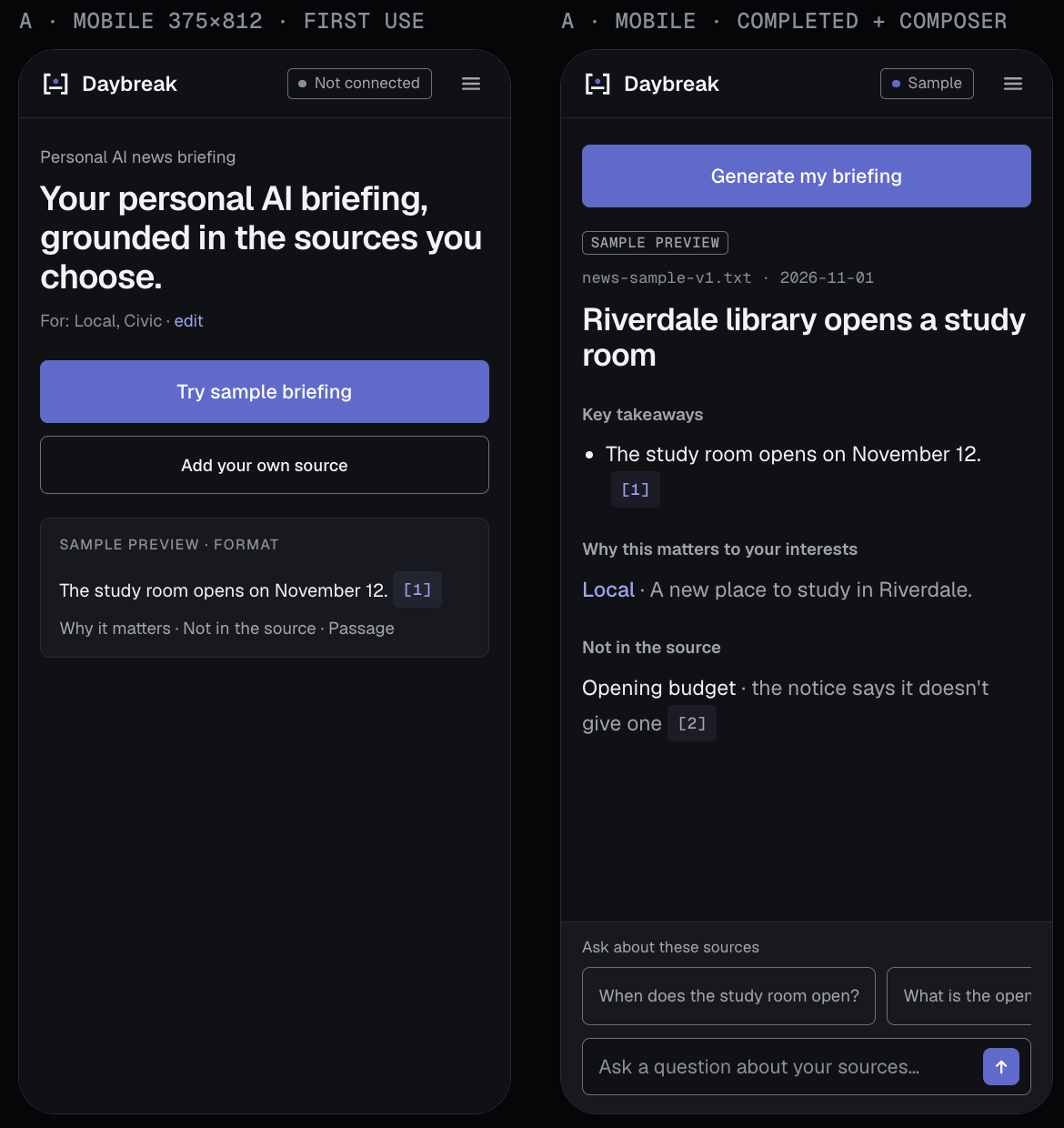
When the design questions are finished, the agent asks whether you want a UI mockup first. This is a separate choice even if you delegated recommended design decisions. Preview the desktop/mobile layout and important states, then request any design changes before starting implementation. A mockup illustrates the intended experience; it does not prove the website or AI backend works.
The separate UI/UX reference explains the Linear-inspired dark direction, layout patterns, states and accessibility checks. It does not dictate a startup idea or replace an approved brand. Both mockup alternatives should fit the selected product and design system, differing in layout and emphasis rather than importing news features into an unrelated product.
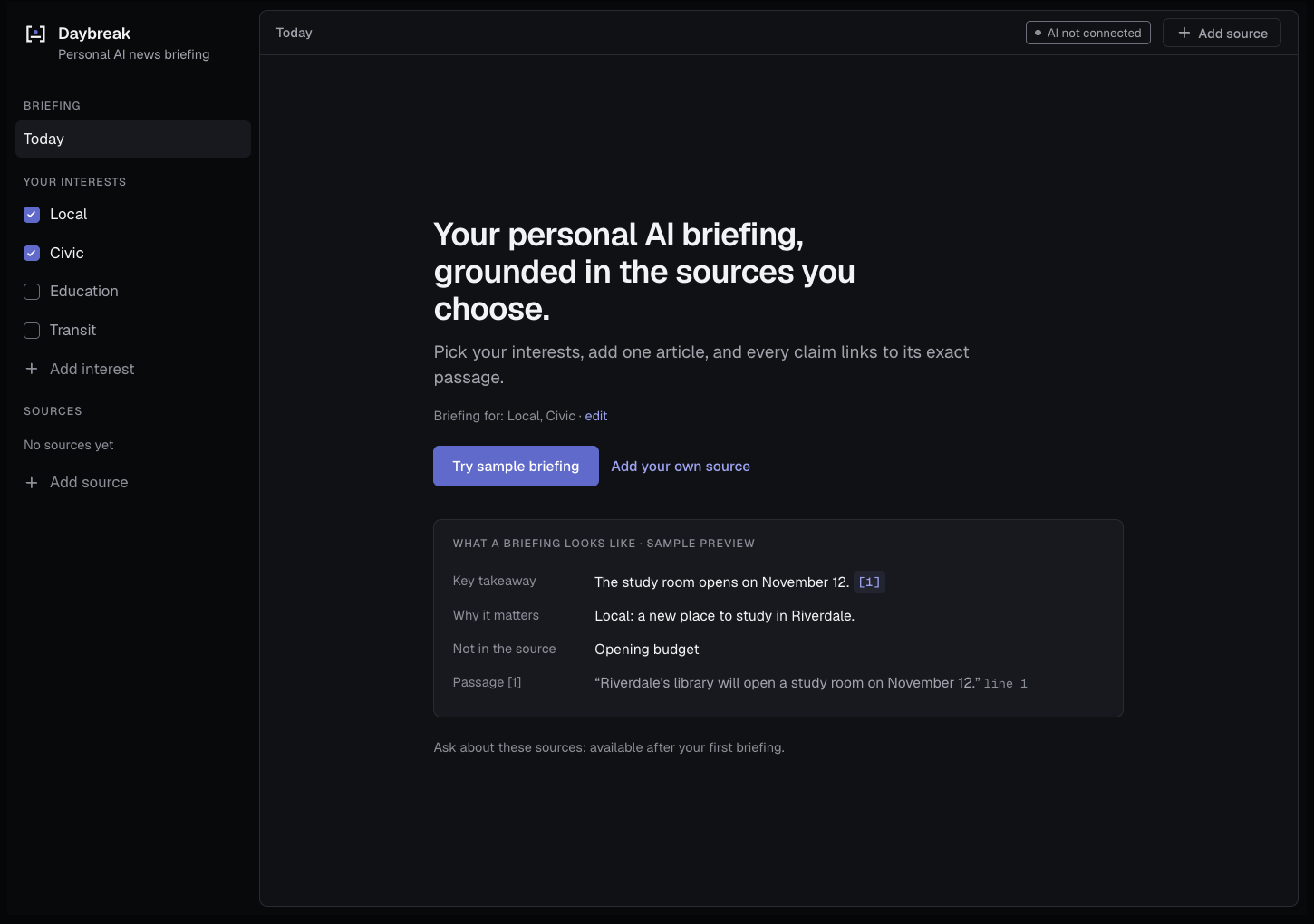
Example desktop mockup: a product identity, selected interests and a useful first-use briefing preview. This is a design preview, not evidence of working AI inference.
You can skip the preview and keep the reviewed plan. Neither choice starts application implementation automatically; use the next prompt when you are ready to build.
After the review and optional mockup, the agent saves both final DESIGN.md and docs/personal-news-design.md to the confirmed project's design folder and returns their knowledge base links. For a different project, the second filename is the plan path you supplied. Open any returned links to check the saved contents and keep them for the reviewer in Tutorial 5. If saving is unavailable, use the reviewed local files to continue building and keep the knowledge base save visibly incomplete.
3. Build the approved plan
Start implementation only after the review summary says which gaps were resolved and which were deferred. Use your coding agent's implementation role for this step. For the example, use docs/personal-news-design.md wherever the prompts ask for the plan path.
Ready to paste. No editing needed.
First follow https://www.massifyai.com/docs-assets/setup/connection-check.md. Complete setup only if needed, then continue below.

First identify the startup idea and product context I already supplied in our current conversation or selected project materials. Use that product even if ready-to-use example values below describe Personal News Intelligence. Missing details within an existing idea are not a reason to replace it. Read https://www.massifyai.com/docs-assets/references/linear-ui-ux.md separately for reusable UI/UX style, layout, flow and accessibility guidance. It supplies no product requirements and does not override my approved brand or design system.

Only if I have not supplied a startup idea, announce in bold: **No startup idea was provided, so this mockup uses the fictional personal news agent example.** Then read https://www.massifyai.com/docs-assets/examples/personal-news-context/website-design.md for that example's product and workflow, and https://www.massifyai.com/docs-assets/examples/personal-news-context/index.md for its linked context and version notes. Do not import Daybreak branding, news actions, the fictional article or T1/T2 into another startup.

In my confirmed project for Personal News Intelligence, using the actual selected product name if the example differs, resolve that product's own brief, decision log, design system, website plan and relevant tasks; do not require news-specific task names for another product. Prefer each complete current knowledge base or Task Board record and its actual link/version, including relevant comments. For each record not found, use a hosted copy only if it belongs to that same product; otherwise ask for essential missing information. Mix live sources with fallbacks only for missing records within the selected product. Do not treat an access error or ambiguous match as not found. Never invent record IDs, import the pack or create tasks merely to start this tutorial. Historical approvals, file inventories and test results are references, not my approval or evidence about my repository. No historical model or budget approval authorizes calls here.

Implement the reviewed docs/personal-news-design.md in the current application repository for the personal morning briefing screen. Prefer the working plan and DESIGN.md reviewed in this session. If missing, prepare drafts from the selected product context and separate visual reference, and resolve the intended baseline and material open choices before implementation. Preserve unrelated work and the actual framework; example repository paths and historical approvals prove nothing about this checkout.

Build the selected product's approved workflow, brand, first-use and populated screens, controls and recovery states. Use the agreed tokens and components. For the personal-news fallback only, apply the product-design document's Daybreak identity, sample welcome, interest/source controls, closed drawer, briefing, citations, unknowns, question composer, exact prerequisite helper text and source-change acceptance checks. For another startup, implement its own approved actions and deterministic examples instead; do not add news features just to follow the example.

This step builds and checks the interface, not a new backend. Keep samples labeled as preview; report capability truthfully. Do not add providers, make external model calls, retrieve live data or simulate autonomous monitoring. Run relevant checks and start a local server, returning its actual verified URL rather than assuming a port. Do not deploy or publish.
After pasting, replace each <placeholder> with your example details.
First follow https://www.massifyai.com/docs-assets/setup/connection-check.md. Complete setup only if needed, then continue below.

First identify the startup idea and product context I already supplied in our current conversation or selected project materials. Use that product even if ready-to-use example values below describe Personal News Intelligence. Missing details within an existing idea are not a reason to replace it. Read https://www.massifyai.com/docs-assets/references/linear-ui-ux.md separately for reusable UI/UX style, layout, flow and accessibility guidance. It supplies no product requirements and does not override my approved brand or design system.

Only if I have not supplied a startup idea, announce in bold: **No startup idea was provided, so this mockup uses the fictional personal news agent example.** Then read https://www.massifyai.com/docs-assets/examples/personal-news-context/website-design.md for that example's product and workflow, and https://www.massifyai.com/docs-assets/examples/personal-news-context/index.md for its linked context and version notes. Do not import Daybreak branding, news actions, the fictional article or T1/T2 into another startup.

In my confirmed project for <project name>, using the actual selected product name if the example differs, resolve that product's own brief, decision log, design system, website plan and relevant tasks; do not require news-specific task names for another product. Prefer each complete current knowledge base or Task Board record and its actual link/version, including relevant comments. For each record not found, use a hosted copy only if it belongs to that same product; otherwise ask for essential missing information. Mix live sources with fallbacks only for missing records within the selected product. Do not treat an access error or ambiguous match as not found. Never invent record IDs, import the pack or create tasks merely to start this tutorial. Historical approvals, file inventories and test results are references, not my approval or evidence about my repository. No historical model or budget approval authorizes calls here.

Implement the reviewed <plan file> in the current application repository for <page or flow>. Prefer the working plan and DESIGN.md reviewed in this session. If missing, prepare drafts from the selected product context and separate visual reference, and resolve the intended baseline and material open choices before implementation. Preserve unrelated work and the actual framework; example repository paths and historical approvals prove nothing about this checkout.

Build the selected product's approved workflow, brand, first-use and populated screens, controls and recovery states. Use the agreed tokens and components. For the personal-news fallback only, apply the product-design document's Daybreak identity, sample welcome, interest/source controls, closed drawer, briefing, citations, unknowns, question composer, exact prerequisite helper text and source-change acceptance checks. For another startup, implement its own approved actions and deterministic examples instead; do not add news features just to follow the example.

This step builds and checks the interface, not a new backend. Keep samples labeled as preview; report capability truthfully. Do not add providers, make external model calls, retrieve live data or simulate autonomous monitoring. Run relevant checks and start a local server, returning its actual verified URL rather than assuming a port. Do not deploy or publish.
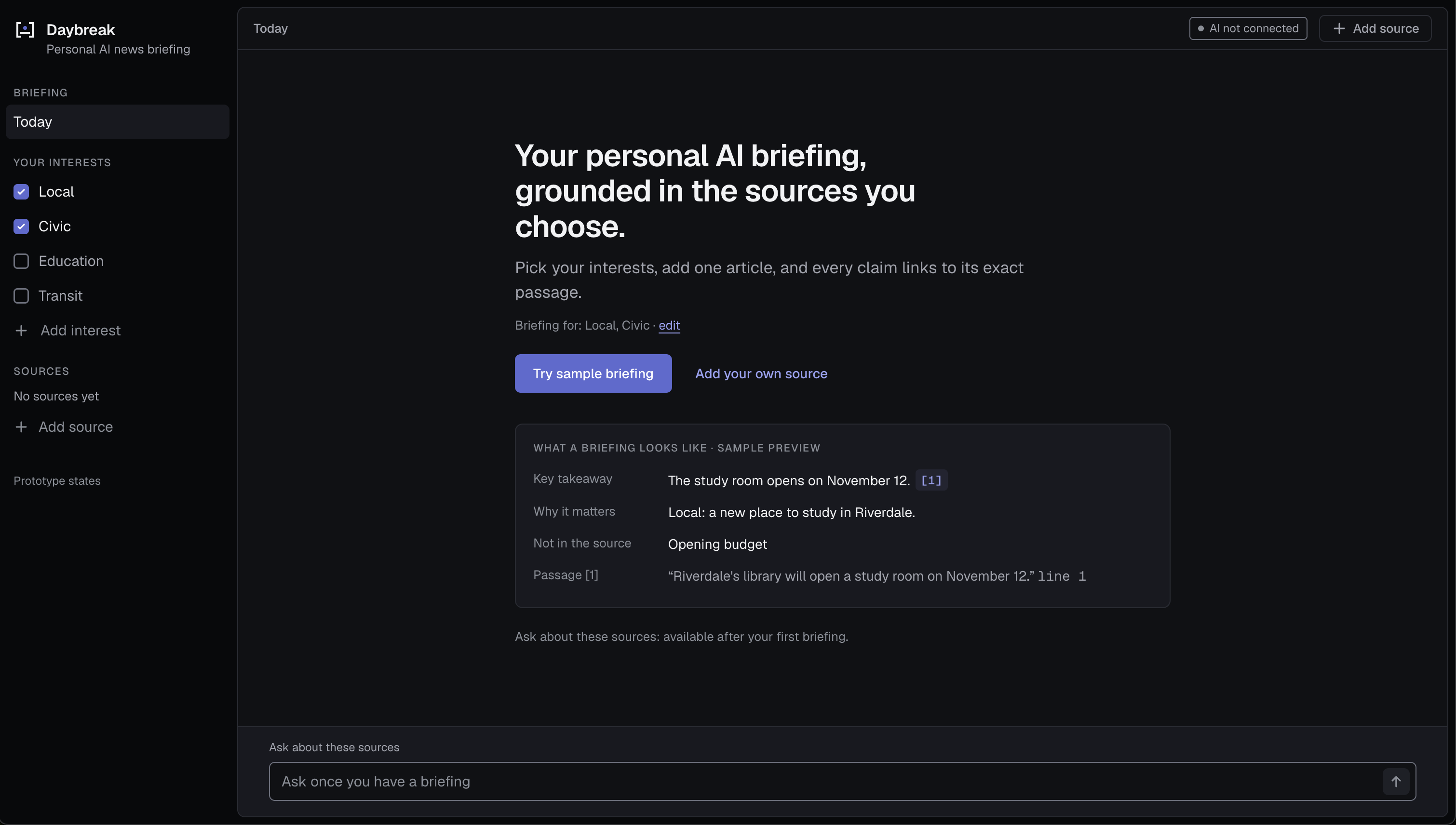
Example built interface: try the sample briefing and inspect its citations and composer. The visible AI not connected status distinguishes the prototype from a connected model.
A plan review cannot see the final pixels. Finish with a live visual review at the viewports and states that matter.
Ready to paste. No editing needed.
First follow https://www.massifyai.com/docs-assets/setup/connection-check.md. Complete setup only if needed, then continue below.

First identify the startup idea and product context I already supplied in our current conversation or selected project materials. Use that product even if ready-to-use example values below describe Personal News Intelligence. Missing details within an existing idea are not a reason to replace it. Read https://www.massifyai.com/docs-assets/references/linear-ui-ux.md separately for reusable UI/UX style, layout, flow and accessibility guidance. It supplies no product requirements and does not override my approved brand or design system.

Only if I have not supplied a startup idea, announce in bold: **No startup idea was provided, so this mockup uses the fictional personal news agent example.** Then read https://www.massifyai.com/docs-assets/examples/personal-news-context/website-design.md for that example's product and workflow, and https://www.massifyai.com/docs-assets/examples/personal-news-context/index.md for its linked context and version notes. Do not import Daybreak branding, news actions, the fictional article or T1/T2 into another startup.

In my confirmed project for Personal News Intelligence, using the actual selected product name if the example differs, resolve that product's own brief, decision log, design system, website plan and relevant tasks; do not require news-specific task names for another product. Prefer each complete current knowledge base or Task Board record and its actual link/version, including relevant comments. For each record not found, use a hosted copy only if it belongs to that same product; otherwise ask for essential missing information. Mix live sources with fallbacks only for missing records within the selected product. Do not treat an access error or ambiguous match as not found. Never invent record IDs, import the pack or create tasks merely to start this tutorial. Historical approvals, file inventories and test results are references, not my approval or evidence about my repository. No historical model or budget approval authorizes calls here.

Use the actual local server URL returned by the implementation step and verify it is running. Inspect the personal morning briefing flow against the working docs/personal-news-design.md, DESIGN.md and the selected product's requirements at 1280 × 900 and 375 × 812. If a local output is missing, identify that prerequisite; a hosted reference may be a labeled comparison baseline, never evidence of a current pass.

Check the selected product's first-use purpose and primary action, populated state, navigation, controls, loading/empty/error/success/partial states and recovery. Exercise real preview controls, context changes, focus return and invalid input. Verify typography, spacing, overflow, text contrast, visible focus, keyboard access, screen-reader names and touch targets. Capture first-use and populated layouts with viewport, state and reproduction details.

For the personal-news fallback only, use its fictional sample article and AC1–AC6. Check the exact disabled-composer helper text, sample action, question readiness, exact source passages, explicit unknowns and pending source/topic replacement. For another product, use its own deterministic cases and acceptance criteria. Never count the news snapshot's historical results as this product's tests. Distinguish UI fixtures from any tested live integration. Fix concrete implementation defects and rerun affected checks. Return evidence and unresolved decisions. Do not add providers or deploy. If the server, plan or required context is unavailable, report that prerequisite.
After pasting, replace each <placeholder> with your example details.
First follow https://www.massifyai.com/docs-assets/setup/connection-check.md. Complete setup only if needed, then continue below.

First identify the startup idea and product context I already supplied in our current conversation or selected project materials. Use that product even if ready-to-use example values below describe Personal News Intelligence. Missing details within an existing idea are not a reason to replace it. Read https://www.massifyai.com/docs-assets/references/linear-ui-ux.md separately for reusable UI/UX style, layout, flow and accessibility guidance. It supplies no product requirements and does not override my approved brand or design system.

Only if I have not supplied a startup idea, announce in bold: **No startup idea was provided, so this mockup uses the fictional personal news agent example.** Then read https://www.massifyai.com/docs-assets/examples/personal-news-context/website-design.md for that example's product and workflow, and https://www.massifyai.com/docs-assets/examples/personal-news-context/index.md for its linked context and version notes. Do not import Daybreak branding, news actions, the fictional article or T1/T2 into another startup.

In my confirmed project for <project name>, using the actual selected product name if the example differs, resolve that product's own brief, decision log, design system, website plan and relevant tasks; do not require news-specific task names for another product. Prefer each complete current knowledge base or Task Board record and its actual link/version, including relevant comments. For each record not found, use a hosted copy only if it belongs to that same product; otherwise ask for essential missing information. Mix live sources with fallbacks only for missing records within the selected product. Do not treat an access error or ambiguous match as not found. Never invent record IDs, import the pack or create tasks merely to start this tutorial. Historical approvals, file inventories and test results are references, not my approval or evidence about my repository. No historical model or budget approval authorizes calls here.

Use the actual local server URL returned by the implementation step and verify it is running. Inspect <page or flow> against the working <plan file>, DESIGN.md and the selected product's requirements at 1280 × 900 and 375 × 812. If a local output is missing, identify that prerequisite; a hosted reference may be a labeled comparison baseline, never evidence of a current pass.

Check the selected product's first-use purpose and primary action, populated state, navigation, controls, loading/empty/error/success/partial states and recovery. Exercise real preview controls, context changes, focus return and invalid input. Verify typography, spacing, overflow, text contrast, visible focus, keyboard access, screen-reader names and touch targets. Capture first-use and populated layouts with viewport, state and reproduction details.

For the personal-news fallback only, use its fictional sample article and AC1–AC6. Check the exact disabled-composer helper text, sample action, question readiness, exact source passages, explicit unknowns and pending source/topic replacement. For another product, use its own deterministic cases and acceptance criteria. Never count the news snapshot's historical results as this product's tests. Distinguish UI fixtures from any tested live integration. Fix concrete implementation defects and rerun affected checks. Return evidence and unresolved decisions. Do not add providers or deploy. If the server, plan or required context is unavailable, report that prerequisite.
For the news briefing example, also replace an article or change the selected topic while a summary is loading. The eventual briefing must not silently present an old summary or source as current. Check this transition as well as the individual loading and success screens.
If the agent cannot open a browser, keep visual review incomplete: open its local URL yourself, exercise the same states, and give it your observations. A passing build alone does not establish that the page looks or behaves as planned.
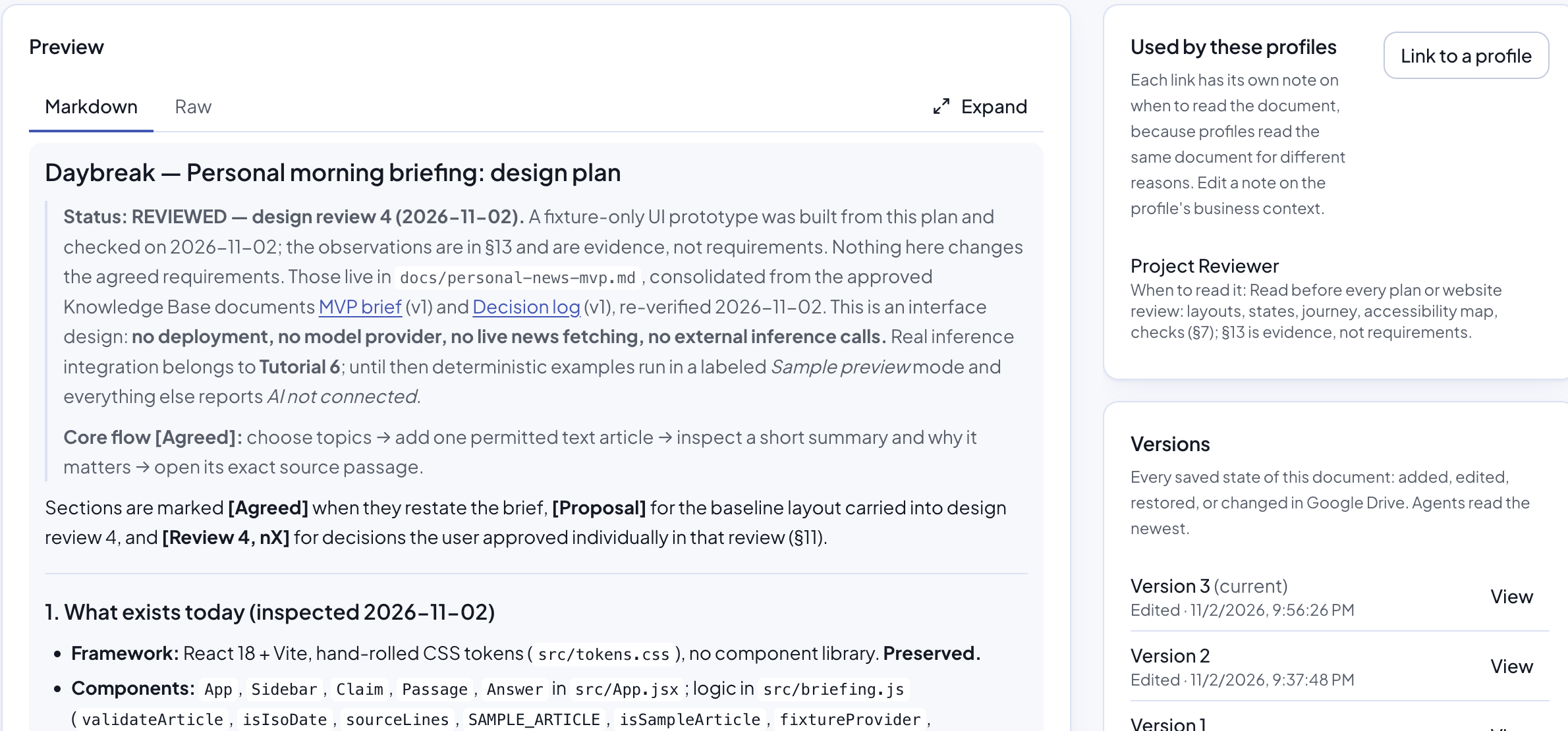
Open the returned knowledge base document to verify its design content, profile references and version history.
After you approve the built result, keep the durable decisions in the repository's design plan and DESIGN.md. The review step already saved both documents to knowledge base. Refresh those same documents if approved goals changed, and keep inspection evidence clearly separate from requirements so the reviewer in Tutorial 5 can compare the real website against them.
Ready to paste. No editing needed.
First follow https://www.massifyai.com/docs-assets/setup/connection-check.md. Complete setup only if needed, then continue below.

First identify the startup idea and product context I already supplied in our current conversation or selected project materials. Use that product even if ready-to-use example values below describe Personal News Intelligence. Missing details within an existing idea are not a reason to replace it. Read https://www.massifyai.com/docs-assets/references/linear-ui-ux.md separately for reusable UI/UX style, layout, flow and accessibility guidance. It supplies no product requirements and does not override my approved brand or design system.

Only if I have not supplied a startup idea, announce in bold: **No startup idea was provided, so this mockup uses the fictional personal news agent example.** Then read https://www.massifyai.com/docs-assets/examples/personal-news-context/website-design.md for that example's product and workflow, and https://www.massifyai.com/docs-assets/examples/personal-news-context/index.md for its linked context and version notes. Do not import Daybreak branding, news actions, the fictional article or T1/T2 into another startup.

In my confirmed project for Personal News Intelligence, using the actual selected product name if the example differs, resolve that product's own brief, decision log, design system, website plan and relevant tasks; do not require news-specific task names for another product. Prefer each complete current knowledge base or Task Board record and its actual link/version, including relevant comments. For each record not found, use a hosted copy only if it belongs to that same product; otherwise ask for essential missing information. Mix live sources with fallbacks only for missing records within the selected product. Do not treat an access error or ambiguous match as not found. Never invent record IDs, import the pack or create tasks merely to start this tutorial. Historical approvals, file inventories and test results are references, not my approval or evidence about my repository. No historical model or budget approval authorizes calls here.

Read the finalized DESIGN.md, approved docs/personal-news-design.md and fresh inspection evidence for the selected product. Use this session's reviewed outputs, not an unchanged example snapshot. If final outputs do not exist, prepare drafts and finish the review/build checks first; do not call the hosted references completed work.

Use the confirmed selected product's project. Find the two knowledge base documents saved after the design review: “Personal News Intelligence — Design system” and “Personal News Intelligence — Website design”. Reuse actual IDs and their design folder; update changed approved contents rather than creating duplicates. If no matching documents exist, save the two complete outputs in the existing design folder or Project context/Design. Use the real product name, preserving approved goals, source links/versions, identity, layout, states and unresolved choices. Keep product requirements separate from the reusable UI/UX reference, and label the personal-news fallback if it was used.

Keep test observations in a separate evidence section with tested revision, viewport, state and result. Do not turn current behavior into a new requirement. Verify both saves and return each filename, folder, clickable link, version and published or pending-review status. If writing is unavailable, retain the local files and report unsaved outputs truthfully. Do not change the website, overwrite the original brief/decisions, import task snapshots or publish the site. Keep the actual local URL in this conversation for Tutorial 5; it is a runtime detail, not a permanent requirement.
After pasting, replace each <placeholder> with your example details.
First follow https://www.massifyai.com/docs-assets/setup/connection-check.md. Complete setup only if needed, then continue below.

First identify the startup idea and product context I already supplied in our current conversation or selected project materials. Use that product even if ready-to-use example values below describe Personal News Intelligence. Missing details within an existing idea are not a reason to replace it. Read https://www.massifyai.com/docs-assets/references/linear-ui-ux.md separately for reusable UI/UX style, layout, flow and accessibility guidance. It supplies no product requirements and does not override my approved brand or design system.

Only if I have not supplied a startup idea, announce in bold: **No startup idea was provided, so this mockup uses the fictional personal news agent example.** Then read https://www.massifyai.com/docs-assets/examples/personal-news-context/website-design.md for that example's product and workflow, and https://www.massifyai.com/docs-assets/examples/personal-news-context/index.md for its linked context and version notes. Do not import Daybreak branding, news actions, the fictional article or T1/T2 into another startup.

In my confirmed project for <project name>, using the actual selected product name if the example differs, resolve that product's own brief, decision log, design system, website plan and relevant tasks; do not require news-specific task names for another product. Prefer each complete current knowledge base or Task Board record and its actual link/version, including relevant comments. For each record not found, use a hosted copy only if it belongs to that same product; otherwise ask for essential missing information. Mix live sources with fallbacks only for missing records within the selected product. Do not treat an access error or ambiguous match as not found. Never invent record IDs, import the pack or create tasks merely to start this tutorial. Historical approvals, file inventories and test results are references, not my approval or evidence about my repository. No historical model or budget approval authorizes calls here.

Read the finalized DESIGN.md, approved <plan file> and fresh inspection evidence for the selected product. Use this session's reviewed outputs, not an unchanged example snapshot. If final outputs do not exist, prepare drafts and finish the review/build checks first; do not call the hosted references completed work.

Use the confirmed selected product's project. Find the two knowledge base documents saved after the design review: “<project name> — Design system” and “<project name> — Website design”. Reuse actual IDs and their design folder; update changed approved contents rather than creating duplicates. If no matching documents exist, save the two complete outputs in the existing design folder or Project context/Design. Use the real product name, preserving approved goals, source links/versions, identity, layout, states and unresolved choices. Keep product requirements separate from the reusable UI/UX reference, and label the personal-news fallback if it was used.

Keep test observations in a separate evidence section with tested revision, viewport, state and result. Do not turn current behavior into a new requirement. Verify both saves and return each filename, folder, clickable link, version and published or pending-review status. If writing is unavailable, retain the local files and report unsaved outputs truthfully. Do not change the website, overwrite the original brief/decisions, import task snapshots or publish the site. Keep the actual local URL in this conversation for Tutorial 5; it is a runtime detail, not a permanent requirement.
Open both saved design documents and confirm they reflect the decisions you approved. Keep their links and the running website URL for the next tutorial. If a save is pending or unavailable, keep the reviewed files available and resolve that prerequisite before attaching them to a profile. A reusable team skill is an optional later step.
specific brief→
reviewed design plan→
inspected implementation→
reusable design knowledge→
stronger next page
↺
That closes the workspace improvement loop: specific brief → reviewed design plan → inspected implementation → reusable design knowledge → stronger next page. Session recording and history mining are not required for this workflow.
Last reviewed: 2026-11-03 · Maintained by MassifyAI documentation team Hosted MassifyAI. Availability and permissions depend on your organization and client.