Tutorial 3 of 15 · Build your first project. Follow the sequence or bring your own equivalent inputs.
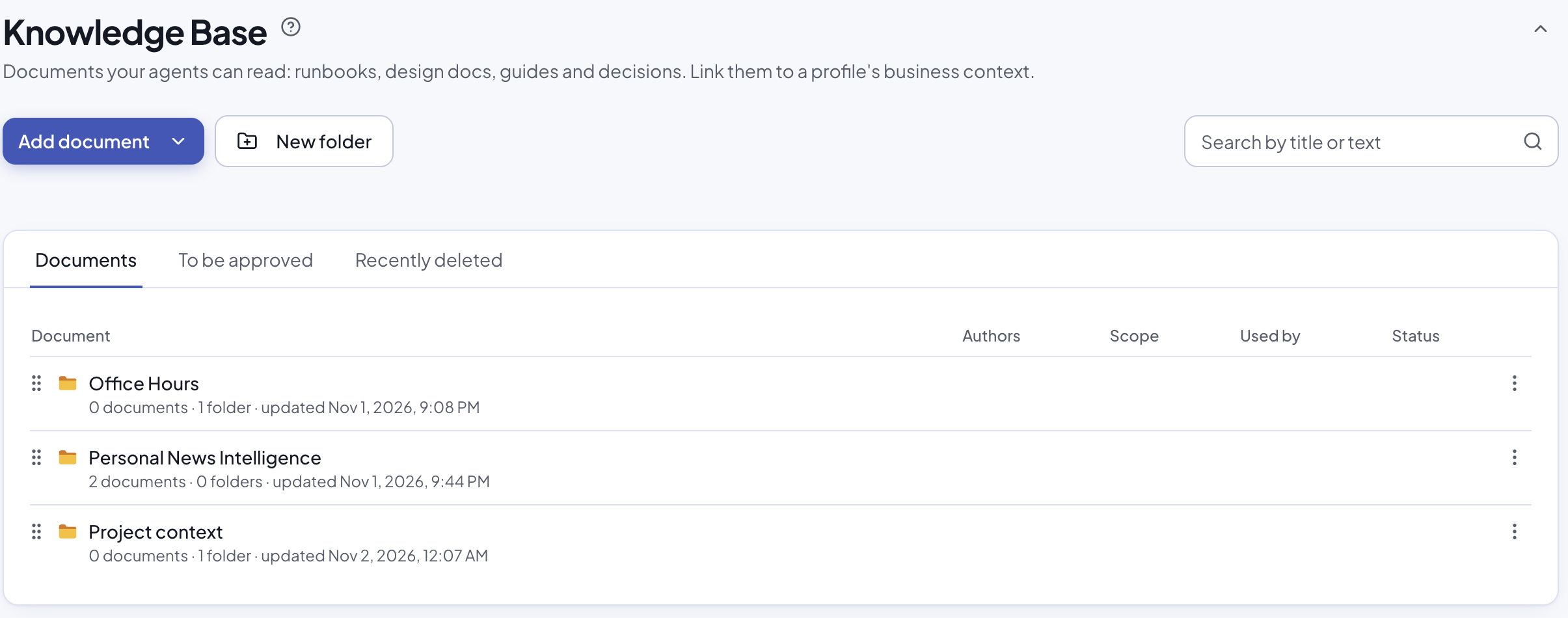
Keep the context your agent needs in the knowledge base so you can continue without pasting the same explanation into every chat.
Use your supplied startup context first. The product example and reusable UI/UX reference serve different purposes. If no startup idea was supplied, the agent must explicitly announce the personal-news-agent fallback in bold. Missing prior outputs still remain prerequisites.
Before you start
Bring your project brief and one task from the previous tutorial. The ready-to-use path continues with the personal news intelligence MVP specification. Confirm the intended project and that you can add documents there.
1. Prepare the project knowledge
Keep durable decisions separate from open questions. For a personal news intelligence app, the brief might specify source citations; the decision log explains why unsupported answers must be marked as unknown. If you already have a PRD or design brief, carry its agreed user goals and acceptance criteria into the saved brief and retain the source links. Leave unsettled visual choices open for the next tutorial.
Using the sample brief? A concrete decision to review is: “Show an explicit unknown result when the documents do not support an answer, so users can distinguish missing evidence from a supported answer.” Add only decisions you agree with; leave other choices open.
Ready to paste. No editing needed.
First follow https://www.massifyai.com/docs-assets/setup/connection-check.md. Complete setup only if needed, then continue below.

Use the startup idea and product context I already supplied; ready-to-use example names and news-specific instructions below apply only to the news fallback. Missing requirements, saved records or local code for my product are not a reason to substitute a different startup. Only if I have not supplied a startup idea, announce in bold: **No startup idea was provided, so this mockup uses the fictional personal news agent example.** For that fallback, read https://www.massifyai.com/docs-assets/examples/personal-news-context/website-design.md as product context. Read https://www.massifyai.com/docs-assets/references/linear-ui-ux.md separately for reusable UI/UX guidance when relevant; preserve my approved brand and design goals. For another product, adapt examples and checks to its actual workflow. The fallback does not establish completed work: missing saved documents, reviewed profiles, running websites or implementations remain prerequisites. Preserve the authorization and approval limits of this step.

Read https://www.massifyai.com/docs-assets/examples/personal-news-mvp-spec.md and the personal news intelligence task proposal from the previous tutorial.

Prepare two knowledge base drafts in my confirmed project: “Personal News Intelligence — MVP brief” and “Personal News Intelligence — Decision log”. The brief should preserve the customer assumption, MVP scope, acceptance checks, agreed design goals and their source links where supplied, out-of-scope items, and open decisions. Do not invent a design specification when none exists. The decision log should record that supported answers need exact source passages, unsupported questions return an explicit unknown, and stale answers never become current after a source change. Keep unmade product decisions open. Search for existing documents first, show whether each would be created or updated, and do not save yet.
After pasting, replace each <placeholder> with your example details.
First follow https://www.massifyai.com/docs-assets/setup/connection-check.md. Complete setup only if needed, then continue below.

Use the startup idea and product context I already supplied; ready-to-use example names and news-specific instructions below apply only to the news fallback. Missing requirements, saved records or local code for my product are not a reason to substitute a different startup. Only if I have not supplied a startup idea, announce in bold: **No startup idea was provided, so this mockup uses the fictional personal news agent example.** For that fallback, read https://www.massifyai.com/docs-assets/examples/personal-news-context/website-design.md as product context. Read https://www.massifyai.com/docs-assets/references/linear-ui-ux.md separately for reusable UI/UX guidance when relevant; preserve my approved brand and design goals. For another product, adapt examples and checks to its actual workflow. The fallback does not establish completed work: missing saved documents, reviewed profiles, running websites or implementations remain prerequisites. Preserve the authorization and approval limits of this step.

Read <MVP brief> and the personal news intelligence task proposal from the previous tutorial.

Prepare two knowledge base drafts in my confirmed project: “<project name> — MVP brief” and “<project name> — Decision log”. The brief should preserve the customer assumption, MVP scope, acceptance checks, agreed design goals and their source links where supplied, out-of-scope items, and open decisions. Do not invent a design specification when none exists. The decision log should record that <agreed decisions>. Keep unmade product decisions open. Search for existing documents first, show whether each would be created or updated, and do not save yet.
The example turns the same hosted MVP specification into durable project context. Switch to Prompt template to supply your own brief and decisions.
Review the draft and correct any assumptions. A decision you have not made should remain an open question.
2. Save the agreed documents and link the task
Ready to paste. No editing needed.
First follow https://www.massifyai.com/docs-assets/setup/connection-check.md. Complete setup only if needed, then continue below.

Use the startup idea and product context I already supplied; ready-to-use example names and news-specific instructions below apply only to the news fallback. Missing requirements, saved records or local code for my product are not a reason to substitute a different startup. Only if I have not supplied a startup idea, announce in bold: **No startup idea was provided, so this mockup uses the fictional personal news agent example.** For that fallback, read https://www.massifyai.com/docs-assets/examples/personal-news-context/website-design.md as product context. Read https://www.massifyai.com/docs-assets/references/linear-ui-ux.md separately for reusable UI/UX guidance when relevant; preserve my approved brand and design goals. For another product, adapt examples and checks to its actual workflow. The fallback does not establish completed work: missing saved documents, reviewed profiles, running websites or implementations remain prerequisites. Preserve the authorization and approval limits of this step.

Save the reviewed “Personal News Intelligence — MVP brief” and “Personal News Intelligence — Decision log” in Project context in the MassifyAI project confirmed for this session. Preserve existing matching documents rather than creating duplicates. Return their actual saved links and versions, or pending-review status. Find the existing task for the source-grounded news briefing from Tutorial 2 by its outcome and acceptance criteria; add the brief's link in a comment without changing its owner, state, or acceptance criteria. If several tasks match, show the matches instead of guessing. Do not create an unrelated task.
After pasting, replace each <placeholder> with your example details.
First follow https://www.massifyai.com/docs-assets/setup/connection-check.md. Complete setup only if needed, then continue below.

Use the startup idea and product context I already supplied; ready-to-use example names and news-specific instructions below apply only to the news fallback. Missing requirements, saved records or local code for my product are not a reason to substitute a different startup. Only if I have not supplied a startup idea, announce in bold: **No startup idea was provided, so this mockup uses the fictional personal news agent example.** For that fallback, read https://www.massifyai.com/docs-assets/examples/personal-news-context/website-design.md as product context. Read https://www.massifyai.com/docs-assets/references/linear-ui-ux.md separately for reusable UI/UX guidance when relevant; preserve my approved brand and design goals. For another product, adapt examples and checks to its actual workflow. The fallback does not establish completed work: missing saved documents, reviewed profiles, running websites or implementations remain prerequisites. Preserve the authorization and approval limits of this step.

Save the reviewed “<project name> — MVP brief” and “<project name> — Decision log” in <knowledge base folder> in the MassifyAI project confirmed for this session. Preserve existing matching documents rather than creating duplicates. Return their actual saved links and versions, or pending-review status. Find the existing task for <task> from Tutorial 2 by its outcome and acceptance criteria; add the brief's link in a comment without changing its owner, state, or acceptance criteria. If several tasks match, show the matches instead of guessing. Do not create an unrelated task.
Open the returned links. Check that the saved content and destination match what you reviewed.
Keep the brief and decision log in the intended project folder so later sessions can retrieve them.
Keep both links for the next steps. If a save times out, look for the saved documents before retrying. A returned link is also useful when a newly saved document has not appeared in search yet.
3. Retrieve the context in a fresh chat
Ready to paste. No editing needed.
First follow https://www.massifyai.com/docs-assets/setup/connection-check.md. Complete setup only if needed, then continue below.

Use the startup idea and product context I already supplied; ready-to-use example names and news-specific instructions below apply only to the news fallback. Missing requirements, saved records or local code for my product are not a reason to substitute a different startup. Only if I have not supplied a startup idea, announce in bold: **No startup idea was provided, so this mockup uses the fictional personal news agent example.** For that fallback, read https://www.massifyai.com/docs-assets/examples/personal-news-context/website-design.md as product context. Read https://www.massifyai.com/docs-assets/references/linear-ui-ux.md separately for reusable UI/UX guidance when relevant; preserve my approved brand and design goals. For another product, adapt examples and checks to its actual workflow. The fallback does not establish completed work: missing saved documents, reviewed profiles, running websites or implementations remain prerequisites. Preserve the authorization and approval limits of this step.

Confirm my MassifyAI organization and project. Find “Personal News Intelligence — MVP brief” and “Personal News Intelligence — Decision log” in Project context. Read their complete current versions, following any remaining pages, and return their actual links and versions. Find the source-grounded briefing task from Tutorial 2, including its current state, subtasks, owner and recent comments.

Give me a short plain-language project update: the morning briefing goal, what the records actually establish, active work, blockers and unresolved decisions. Explain the exact-source and unknown-information rules without assuming I have read the documents. Distinguish planned work from tested results. Recommend one next focus with a reason and acceptance check, respecting current ownership. Put source links/versions and any missing evidence after the explanation. Resolve names against content; if a resource is missing or ambiguous, report it rather than inventing a link. Make no changes.
After pasting, replace each <placeholder> with your example details.
First follow https://www.massifyai.com/docs-assets/setup/connection-check.md. Complete setup only if needed, then continue below.

Use the startup idea and product context I already supplied; ready-to-use example names and news-specific instructions below apply only to the news fallback. Missing requirements, saved records or local code for my product are not a reason to substitute a different startup. Only if I have not supplied a startup idea, announce in bold: **No startup idea was provided, so this mockup uses the fictional personal news agent example.** For that fallback, read https://www.massifyai.com/docs-assets/examples/personal-news-context/website-design.md as product context. Read https://www.massifyai.com/docs-assets/references/linear-ui-ux.md separately for reusable UI/UX guidance when relevant; preserve my approved brand and design goals. For another product, adapt examples and checks to its actual workflow. The fallback does not establish completed work: missing saved documents, reviewed profiles, running websites or implementations remain prerequisites. Preserve the authorization and approval limits of this step.

Confirm my MassifyAI organization and project. Find “<project name> — MVP brief” and “<project name> — Decision log” in <knowledge base folder>. Read their complete current versions, following any remaining pages, and return their actual links and versions. Find <task> from Tutorial 2, including its current state, subtasks, owner and recent comments.

Give me a short plain-language project update: the morning briefing goal, what the records actually establish, active work, blockers and unresolved decisions. Explain the exact-source and unknown-information rules without assuming I have read the documents. Distinguish planned work from tested results. Recommend one next focus with a reason and acceptance check, respecting current ownership. Put source links/versions and any missing evidence after the explanation. Resolve names against content; if a resource is missing or ambiguous, report it rather than inventing a link. Make no changes.
If the agent cannot find a document through search, ask it to read the saved link directly and confirm the project and access. A failed search does not mean the save failed. If direct access also fails, resolve that before building the website from those sources.
Ask for the reasoning in the same chat
You can ask about one decision without opening all its source documents:
Ready to paste. No editing needed.
First follow https://www.massifyai.com/docs-assets/setup/connection-check.md. Complete setup only if needed, then continue below.

Use the startup idea and product context I already supplied; ready-to-use example names and news-specific instructions below apply only to the news fallback. Missing requirements, saved records or local code for my product are not a reason to substitute a different startup. Only if I have not supplied a startup idea, announce in bold: **No startup idea was provided, so this mockup uses the fictional personal news agent example.** For that fallback, read https://www.massifyai.com/docs-assets/examples/personal-news-context/website-design.md as product context. Read https://www.massifyai.com/docs-assets/references/linear-ui-ux.md separately for reusable UI/UX guidance when relevant; preserve my approved brand and design goals. For another product, adapt examples and checks to its actual workflow. The fallback does not establish completed work: missing saved documents, reviewed profiles, running websites or implementations remain prerequisites. Preserve the authorization and approval limits of this step.

Explain the most important unresolved decision from that project update in everyday language. Re-read the relevant current knowledge base sections and task comments. Tell me why it matters to the user's goal, what is agreed versus proposed, the available options, and what evidence or choice would let us move forward. Link only the sources behind that explanation and name any missing context. Recommend an option only where the evidence supports it. Do not change a decision, task or document.
Ready to paste. This prompt needs no substitutions.
First follow https://www.massifyai.com/docs-assets/setup/connection-check.md. Complete setup only if needed, then continue below.

Use the startup idea and product context I already supplied; ready-to-use example names and news-specific instructions below apply only to the news fallback. Missing requirements, saved records or local code for my product are not a reason to substitute a different startup. Only if I have not supplied a startup idea, announce in bold: **No startup idea was provided, so this mockup uses the fictional personal news agent example.** For that fallback, read https://www.massifyai.com/docs-assets/examples/personal-news-context/website-design.md as product context. Read https://www.massifyai.com/docs-assets/references/linear-ui-ux.md separately for reusable UI/UX guidance when relevant; preserve my approved brand and design goals. For another product, adapt examples and checks to its actual workflow. The fallback does not establish completed work: missing saved documents, reviewed profiles, running websites or implementations remain prerequisites. Preserve the authorization and approval limits of this step.

Explain the most important unresolved decision from that project update in everyday language. Re-read the relevant current knowledge base sections and task comments. Tell me why it matters to the user's goal, what is agreed versus proposed, the available options, and what evidence or choice would let us move forward. Link only the sources behind that explanation and name any missing context. Recommend an option only where the evidence supports it. Do not change a decision, task or document.
Last reviewed: 2026-11-05 · Maintained by MassifyAI documentation team Hosted MassifyAI. Check client, project and tool availability before following the workflow.